

How does a QR code work? Have you ever pointed your phone at a square made of tiny black and white boxes and suddenly opened a website, made a payment, or seen some information?
That little square is called a QR code.
QR codes are everywhere today. You can find them on restaurant menus, product packages, tickets, posters, payment counters and even school worksheets. But how can a bunch of black and white squares tell your phone what to do?
The answer is surprisingly simple.
Let’s find out how a QR code works.
What Is a QR Code?
QR stands for Quick Response.
A QR code is a type of two-dimensional barcode that stores information using a pattern of small squares.
Unlike a traditional barcode, which usually stores information in one direction using lines, a QR code stores information both horizontally and vertically. This allows it to hold much more information.
A QR code can contain things like:
- A website address
- Text
- Contact information
- Wi-Fi details
- A payment link
- A ticket or boarding pass
- A location
- An app link
The interesting part is that your phone doesn’t actually “understand” the picture as a picture. It uses its camera and software to read the pattern and convert it into digital information.
So, How Does a QR Code Work?
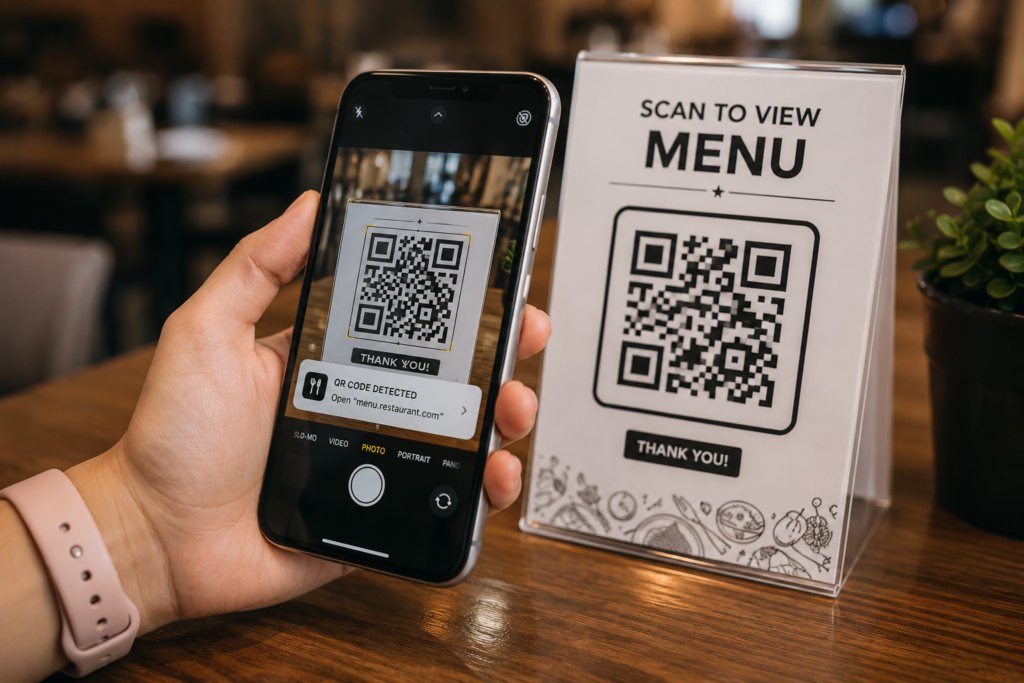
Think of a QR code as a secret message written in a special language of squares.
When you scan it, several things happen very quickly.
Step 1: Your Camera Sees the QR Code
Your phone’s camera captures an image of it. Just like many other things your smartphone does, this involves a surprising amount of technology working behind the scenes. You can also discover [how mobile phones make calls].
The QR code doesn’t have to be perfectly straight or perfectly positioned. Modern QR scanners are designed to recognize the pattern even when the code is slightly tilted or viewed from an angle.
Step 2: Your Phone Finds the QR Code
Your phone’s software looks at the camera image and searches for the special patterns that identify a QR code.
Have you noticed the three large square patterns, usually found near three corners of a QR code?
They are called finder patterns.
These help the phone figure out:
- Where the QR code begins and ends
- Which direction it is facing
- How large the individual squares are
- How the code is positioned
It’s a little like giving your phone three landmarks so it can understand a map.
Step 3: The Tiny Squares Are Read
The QR code is made up of many tiny squares called modules.
These modules are usually either dark or light.
The scanner examines the pattern of these modules and converts them into binary information.
Binary is the language computers use, based mainly on two states:
0 and 1
So, in a very simplified way, the light and dark squares can represent digital information that the computer can understand.
But there’s an important detail: not every square is part of your message.
Some parts of the QR code help the scanner understand how to read the rest of it.
What Are Those Different Squares For?
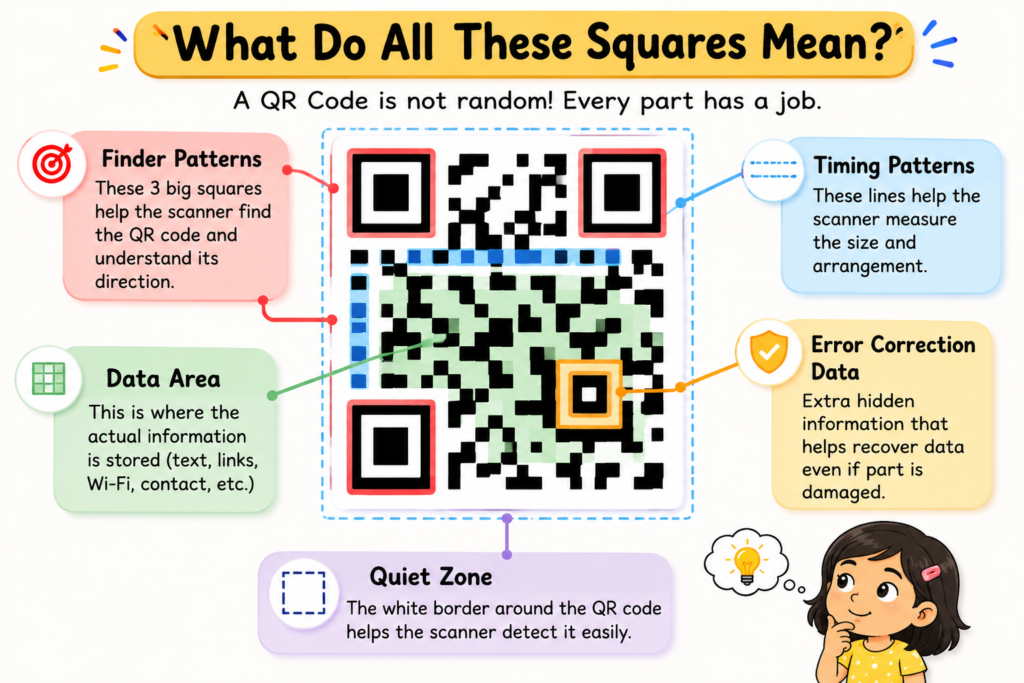
A QR code may look like a random collection of boxes, but it is actually carefully organized.
1. Finder Patterns
The three large squares near the corners help the scanner locate and orient the QR code.
They are one of the main reasons your phone can recognize a QR code so quickly.
2. Timing Patterns
There are also alternating dark and light modules that help the scanner understand the spacing and arrangement of the grid.
They work a little like the markings on a ruler.
3. Data Area
This is where the actual information is stored.
For example, if the QR code contains a website address, the data area contains the digital representation of that information.
4. Error Correction
This is one of the cleverest features of QR codes.
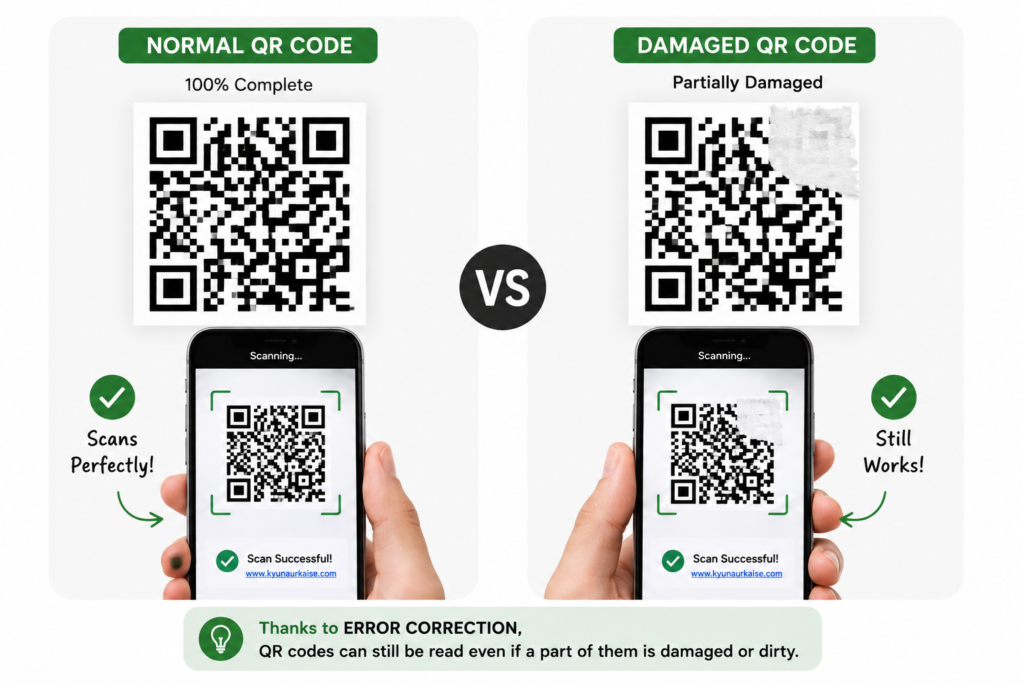
A QR code can still work even when part of it is damaged, dirty or covered.
That’s because QR codes contain error-correction information.
The scanner can use this extra information to reconstruct some missing or damaged data.
That’s why you may sometimes see a QR code with a small logo printed over it and still be able to scan it.
How Can a Damaged QR Code Still Work?
Imagine writing a sentence on a piece of paper and accidentally tearing off a small corner.
You might still be able to understand the sentence because you have enough information left.
QR codes use a more mathematical version of this idea.
They use error-correction techniques based on Reed–Solomon error correction.
The QR code stores some extra information that allows the scanner to recover data if part of the code cannot be read.
There are different levels of error correction, allowing approximately 7%, 15%, 25%, or 30% of the code’s data area to be restored, depending on the level used.
So that little QR code is doing much more than simply storing black and white squares!
What Happens After the Code Is Read?
Once your phone successfully decodes the information, it determines what that information means.
For example, suppose the QR code contains a website address.
Your phone reads the encoded data, recognizes it as a web address, and offers to open it.
Your phone reads the information and uses software to understand what it means — much like the technology behind [how GPS knows our location].
If it contains Wi-Fi details, your phone may offer to connect to the network.
So the QR code itself doesn’t magically open websites or make payments.
It simply stores information in a format that computers and phones can quickly read.
The app or phone then decides what to do with that information.
Why Are QR Codes Black and White?
QR codes don’t necessarily have to be black and white.
What matters is that there is enough contrast between the dark and light areas for the scanner to distinguish them.
Black and white is simply a very reliable combination.
That’s why most QR codes traditionally use dark squares on a light background.
If you make a QR code too colourful, blurry, low-contrast or complicated, your phone may have trouble reading it.
Why Does a QR Code Have a White Border?
Look closely at many QR codes and you’ll notice a blank space around the outside.
This is called the quiet zone.
It helps the scanner distinguish the QR code from the surrounding design.
Without enough empty space around it, the scanner may have difficulty identifying where the QR code starts.
So even the seemingly empty part of a QR code has a job!
Are QR Codes the Same as Barcodes?
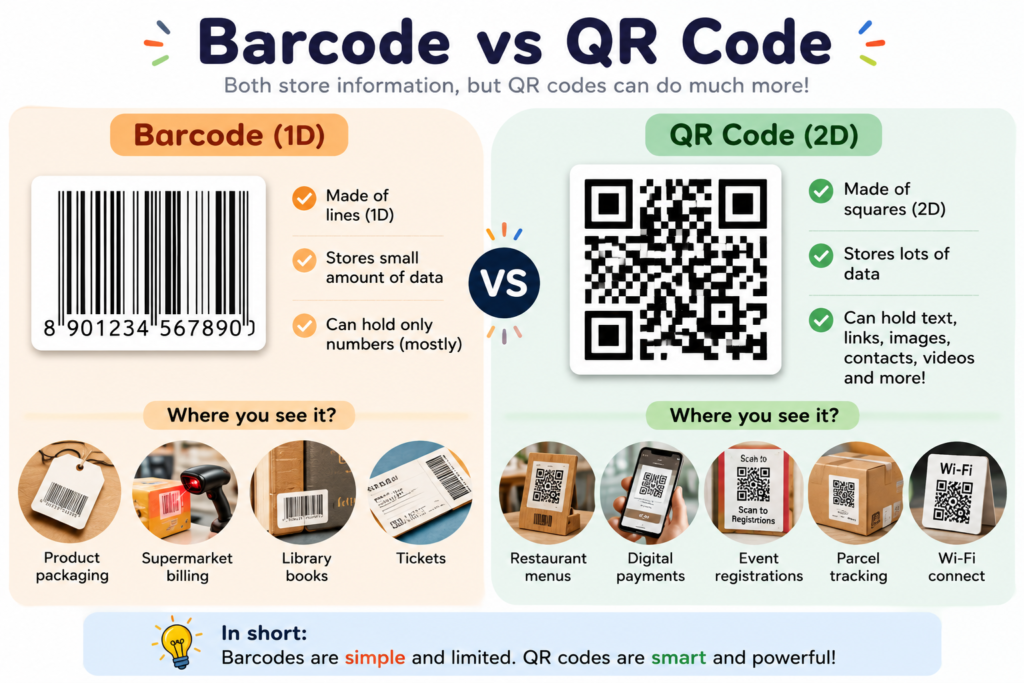
Not quite.
A traditional barcode is usually one-dimensional. It stores information using a series of lines and spaces.
A QR code is two-dimensional, meaning information is arranged across a grid in two directions.
This allows QR codes to store considerably more information than traditional barcodes.
For example, a simple barcode might identify a product, while a QR code can contain a complete website address or other digital information.
Where Did QR Codes Come From?
QR codes were not originally created for smartphones or online payments.
They were invented in Japan in the 1990s by engineers working for DENSO, a company involved in automotive manufacturing.
The original purpose was to help track automobile parts during manufacturing.
The system needed to store more information and be scanned quickly from different directions.
What started as an industrial tracking solution eventually became a technology used all over the world.
Today, QR codes are used for everything from restaurant menus to digital payments.
Why Can Your Phone Scan a QR Code So Quickly?
Because the process is largely automated.
Your phone’s camera continuously looks at the image, while software searches for the recognizable QR patterns.
Once it identifies the code, it determines its orientation, reads the modules, corrects errors if necessary, decodes the information and presents the result.
All of this can happen in a fraction of a second.
That’s why scanning a QR code feels almost instantaneous.
Can You Make Your Own QR Code?
Yes!
You can create a QR code containing a website address, text, contact information and many other types of information using a QR code generator.
Once created, the resulting pattern can be printed or displayed on a screen.
But remember: a QR code is only useful if the information inside it is useful and accessible.
And before scanning an unfamiliar QR code, it’s always a good idea to check where it is going to take you.
Did You Know?
A QR code may look like a random collection of tiny squares, but every part has a purpose.
Some squares help the scanner locate the code. Others help it understand its orientation and structure. Some store the actual information, while others help recover information if part of the code is damaged.
So the next time you see one, don’t just think of it as a funny-looking square.
Think of it as a tiny machine-readable message!
The Big Idea
A QR code works by converting information into a carefully arranged pattern of small squares.
Your phone’s camera captures the pattern. Software identifies the QR code, works out its orientation, reads the modules, uses error correction when necessary, and converts the encoded data back into useful information.
So when you scan a QR code and a website suddenly appears on your phone, there is actually a lot happening behind those little squares.
A QR code is basically a clever way of turning information into a pattern that computers can read extremely quickly.
And that is the fascinating science behind the little square you probably see every day!
1 thought on “How Does a QR Code Work? Discover the Science Behind Those Little Squares”