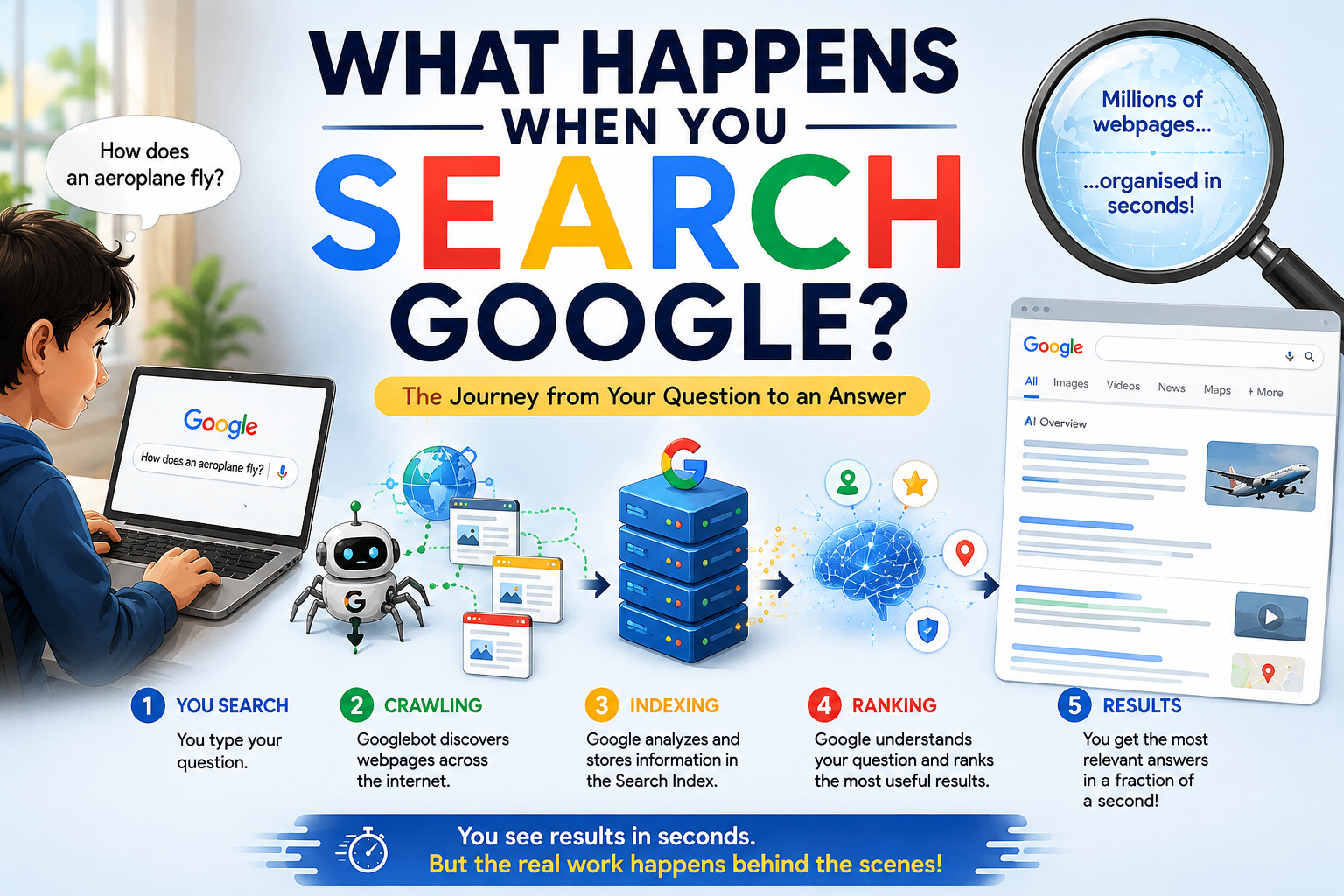
What happens when you search Google? Have you ever wondered what happens between typing a question into Google and seeing an answer on your screen?
You type:
“Why is the sky blue?”
You press Enter.
And almost instantly, Google shows you millions of possible results.
It feels like Google has searched the entire internet in that tiny moment.
But here is the surprising part:
Google isn’t actually searching the entire internet when you press Enter.
The real work has already been happening behind the scenes.
Google has spent enormous amounts of computing power discovering webpages, understanding them, and organizing information in a gigantic search index. When you search, Google’s systems use that index to find and rank information that is most useful for your particular question.
So, what exactly happens?
Let’s follow your search from the moment you type it.
Step 1: You Type Your Question
Let’s say you search:
Your browser sends your search request to Google.
You might think Google simply looks for those exact words on webpages.
It doesn’t.
Google first tries to understand what you actually mean.
For example, if you type:
“Why does my ear pop on a flight?”
Google doesn’t just look for pages containing the exact words ear, pop, and flight.
It tries to understand that you are asking about the pressure changes affecting your ears during air travel.
Understanding the meaning behind a query is one of the most important parts of modern search.
Google uses automated systems to interpret the words, language, context and likely intent behind a search.
And this is happening extremely quickly.
But Wait… Where Did Google Get All Those Webpages?
This is where things get really interesting.
Google doesn’t wait for someone to search before discovering a webpage.
Instead, it has automated programs called web crawlers.
One of the best-known is Googlebot.
Think of Googlebot as a constantly travelling explorer of the web.
It discovers webpages, visits them, reads their content and finds links to other pages.
Then it can follow those links and discover even more pages.
Google says that the vast majority of pages appearing in Search are found automatically rather than being manually submitted by website owners.
So imagine this:
Webpage A → links to Webpage B → links to Webpage C → links to Webpage D
Google’s crawlers can follow these connections and continually discover new and updated content.
And they don’t just visit a page once.
Google regularly revisits pages to check whether they have changed. How often this happens can vary enormously depending on the page and circumstances.
Step 2: Google Crawls the Web
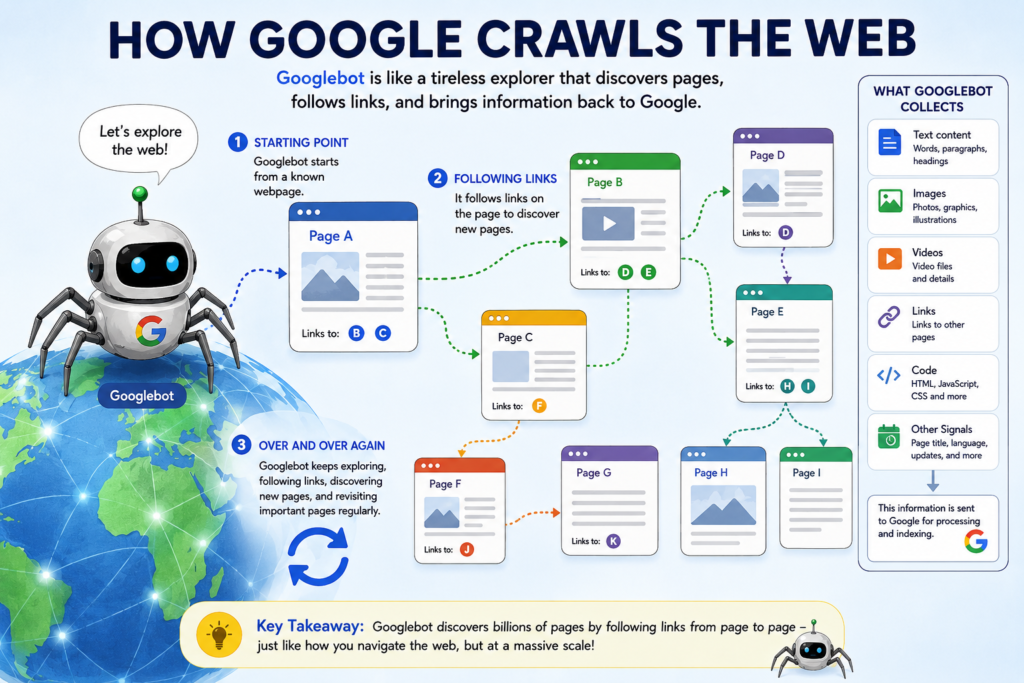
This process is called crawling.
Googlebot requests a webpage from the website’s server.
It can retrieve things such as:
- Text
- Images
- Videos
- Links
- Page titles
- Other information that helps Google understand the page
Modern websites can also contain JavaScript, which may generate content after the initial page loads.
Google can render JavaScript as part of its processing so that it can understand content that isn’t present in the initial HTML.
But here’s something important:
Google doesn’t necessarily crawl every webpage it discovers.
A website can prevent certain pages from being crawled, a page might require a login, or technical problems might make it inaccessible.
Step 3: Google Builds a Giant Index
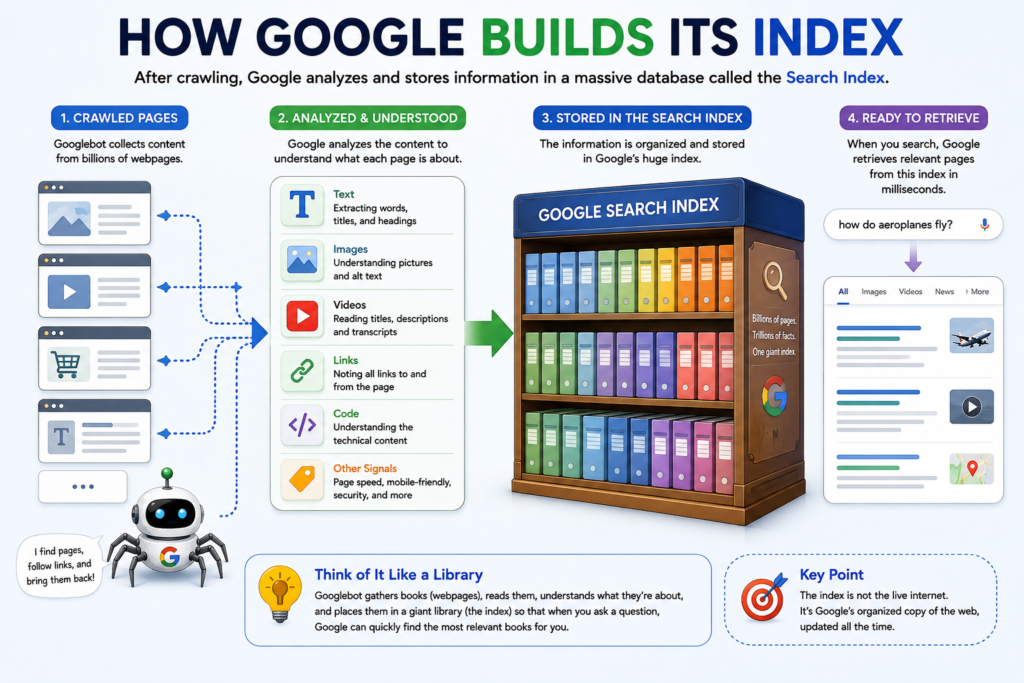
Once Google discovers and processes a webpage, it needs somewhere to store what it learned.
This is called the Google Search index.
Think of the index as a gigantic, constantly changing library catalogue.
But instead of simply recording:
“This website exists.”
Google tries to understand what the page contains.
For example, imagine you publish a page called:
“How Do Touchscreens Know Where You Touched?”
Google may analyze information such as:
- The words on the page
- The title
- Headings
- Images and their information
- Links
- Language
- Other signals about the page
Google then stores information about the page in its index.
This is why Google can respond so quickly.
It doesn’t have to start from zero every time you search.
Think of It Like a Library
Imagine walking into a library containing billions of books.
You ask:
“Books about planets.”
The librarian doesn’t run through every book in the building reading the pages.
Instead, the library already has a huge catalogue telling it:
- Which books exist
- What subjects they cover
- Where they are
- Which ones might be most useful
Google’s index works in a somewhat similar way.
Except the scale is enormous.
And the information is constantly changing.
Step 4: What Happens When You Search Google?
Now we return to your search.
You type:
“How does an aeroplane fly?”
and press Enter.
Google now has to find useful information from its index.
But there could be thousands or even millions of webpages related to your question.
So another huge job begins:
Which results should appear first?
This is where ranking comes in.
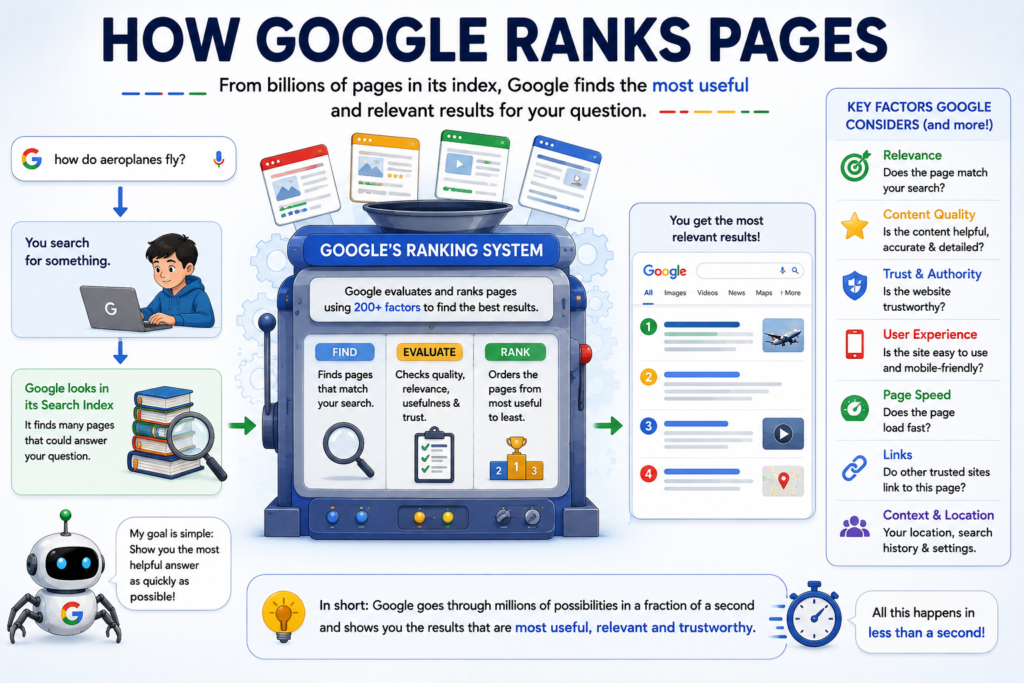
Step 5: Google Ranks the Results
Google uses automated ranking systems to decide which results are most relevant and useful for a particular search.
There isn’t one simple “Google ranking formula.”
Google says its systems use many factors, including things such as relevance, quality, usability and context. Search results can also vary depending on factors such as language, location and device.
For example, imagine two people search:
“pizza near me”
Someone in Lucknow and someone in London aren’t going to need the same results.
Google can use the searcher’s context, including location, to provide more relevant results.
That’s why your Google results aren’t necessarily identical to someone else’s.
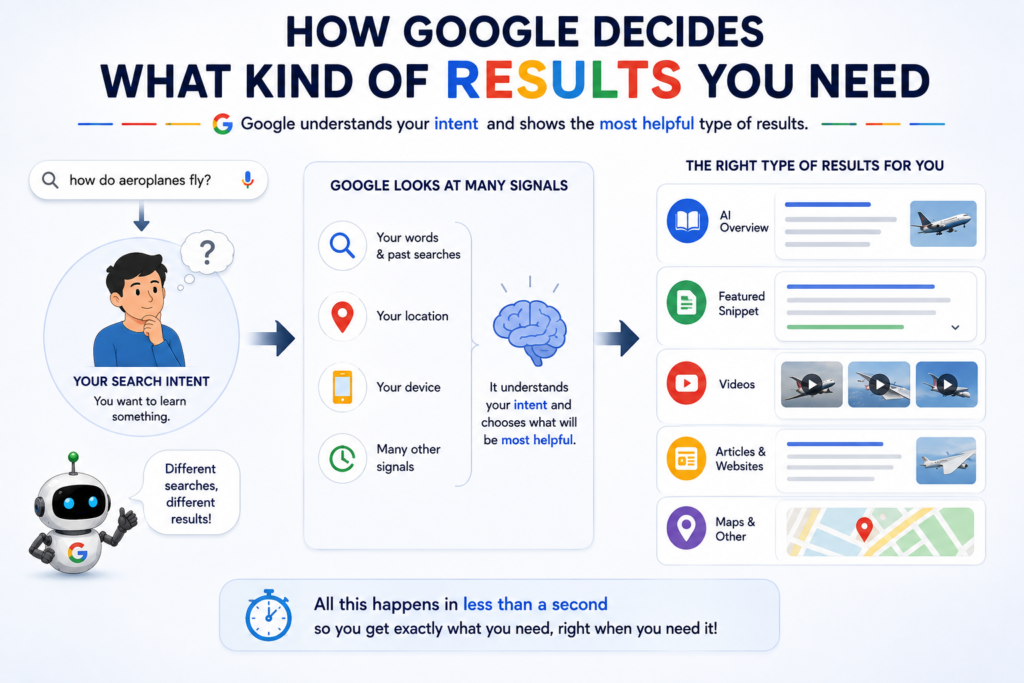
Step 6: Google Decides What Kind of Results You Need
Here’s another clever part.
Google doesn’t always show exactly the same type of search page.
Search for:
“weather today”
and you might get weather information.
Search for:
“best restaurants near me”
and you may see local businesses and maps.
Search for:
“how does a touchscreen work?”
and you may see webpages, images, videos or other search features.
Google automatically determines which types of results are likely to be useful for the query.
Step 7: And Now There's AI
Google Search has changed significantly in recent years.
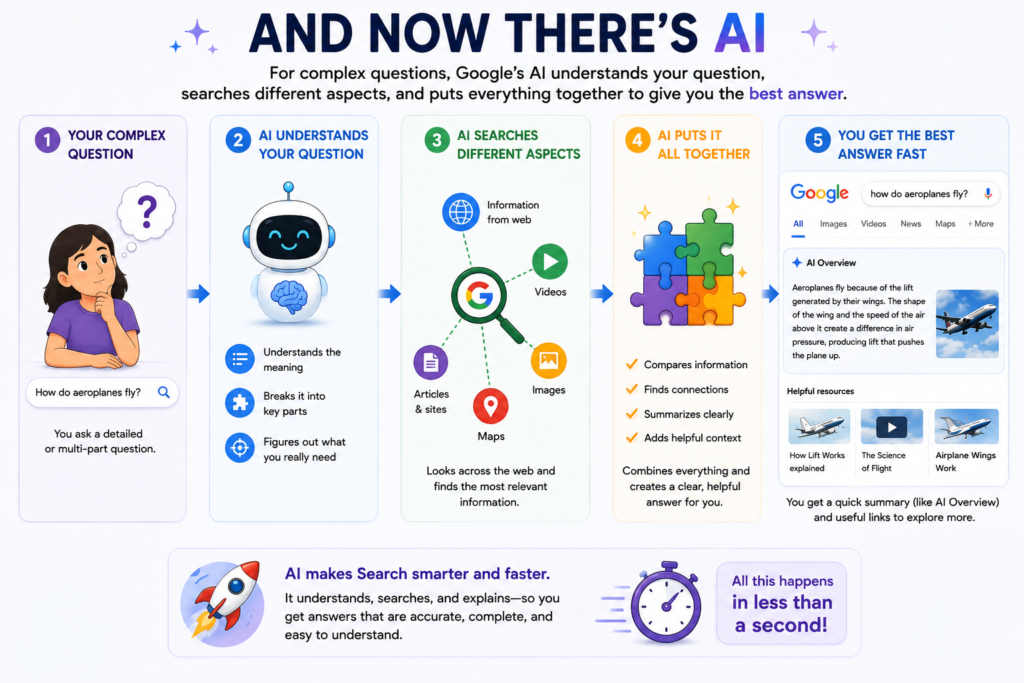
For some searches, you may now see an AI Overview that summarizes information and provides links to relevant webpages.
Google has also developed AI Mode, designed for longer, more complicated questions and follow-up conversations.
For example, instead of searching separately for:
“Best places to visit in Sikkim”
then:
“Best time to visit Sikkim”
then:
“How many days are enough?”
you can ask a much longer question and continue with follow-ups.
Google says AI Mode can break complex questions into multiple related searches — a technique it calls query fan-out — to explore different aspects of a question.
So Google Search is increasingly becoming more than just a list of blue links.
But underneath these newer AI features, the traditional search infrastructure — discovering, understanding and ranking information — still plays an important role.
Step 8: Google Creates Your Search Results Page
Finally, Google puts everything together.
You might see:
An AI Overview
Web results
Images
Videos
Maps
News
Shopping results
or other search features depending on what you searched.
You then scan the results and click the one that looks most useful.
And just like that…
You have your answer.
What feels like a simple two-second interaction actually involved an enormous amount of computing and information processing behind the scenes.
So Does Google Search the Internet Every Time?
No.
This is probably the biggest misconception about Google Search.
When you search Google, it generally isn’t sending out millions of computers to read the internet from scratch.
Instead, much of the heavy work happened before you searched.
The simplified journey looks like this:
Websites publish information
↓
Google discovers webpages
↓
Google crawls them
↓
Google processes and understands them
↓
Information is stored in the Search index
↓
You type a question
↓
Google interprets your query
↓
Google searches its index
↓
Ranking systems select relevant results
↓
Google displays your results
And all of this can happen incredibly quickly.
But What About a Brand-New Webpage?
Suppose someone publishes a webpage one minute ago.
Will it automatically appear when you search for it?
Not necessarily.
Google first needs to discover the page, crawl it, process it and potentially index it.
Google explicitly notes that crawling, indexing and appearing in Search are not guaranteed for every page.
That’s why a webpage doesn’t necessarily appear on Google immediately after it is published.
For some types of content, especially rapidly changing information, Google may crawl pages more frequently. Other pages may be revisited much less often.
Why Doesn't the Best Website Always Come First?
You might wonder:
“If Google knows everything, why isn’t the best webpage always number one?”
Because “best” isn’t a single measurable thing.
Google has to determine which result is most relevant and useful for a particular search.
A webpage can be excellent but still not be the best match for your specific question.
Google’s systems consider many signals and continually evolve to improve the quality of results.
And importantly, Google says websites cannot simply pay Google to rank higher in ordinary Search results.
The Amazing Part: You Don't See Any of This
You simply see a search box.
You type:
“Why is the sky blue?”
You press Enter.
And seconds later, an answer appears.
But behind that simple search box is a massive system involving:
Web crawlers + servers + databases + algorithms + artificial intelligence + ranking systems + your browser + the internet.
That’s what makes Google Search so fascinating.
The search box looks simple.
The technology behind it is anything but simple.
One Search, Millions of Possibilities
The next time you search Google, pause for a second.
Instead of thinking:
“Google is searching the internet.”
Think:
“Google has already organized a huge part of the web, and now it’s trying to find the most useful information for my question.”
And that tiny difference completely changes how you understand Search.
From the moment a webpage is discovered by a crawler to the moment you click a result, there is a remarkable chain of technology working quietly in the background.
You type a question.
Google does the heavy lifting.
And all you see is a search box.
Quick Recap
| What happens? | What does it mean? |
|---|---|
| Crawling | Google discovers and visits webpages |
| Processing | Google analyzes what those pages contain |
| Indexing | Information about pages is stored in Google’s Search index |
| Understanding the query | Google works out what you’re actually looking for |
| Ranking | Google selects and orders relevant results |
| Search features | Google decides whether to show webpages, images, maps, videos, AI features, etc. |
| Results | The final search page appears on your screen |
So the next time someone asks:
“How can Google find an answer so quickly?”
You can tell them:
It doesn’t start searching when you press Enter.
The search started long before you asked the question.