
Have you ever typed 25 × 4 into a calculator, pressed =, and wondered how that little device knew the answer was 100?
It looks almost effortless.
You press a few buttons. Numbers appear on the screen. You press another button, and the answer arrives almost instantly.
But a calculator isn’t actually doing mathematics the way you do it on paper.
Inside that small plastic box is a tiny electronic system that detects your button presses, represents numbers electronically, follows instructions, performs calculations and converts the result back into something your eyes can read.
And surprisingly, the basic idea behind a simple pocket calculator is not very different from what happens inside much more powerful computing devices.
So, how does a calculator work?
Let’s take one apart—at least conceptually.
What Is a Calculator?
A calculator is essentially a special-purpose computer designed to perform mathematical operations.
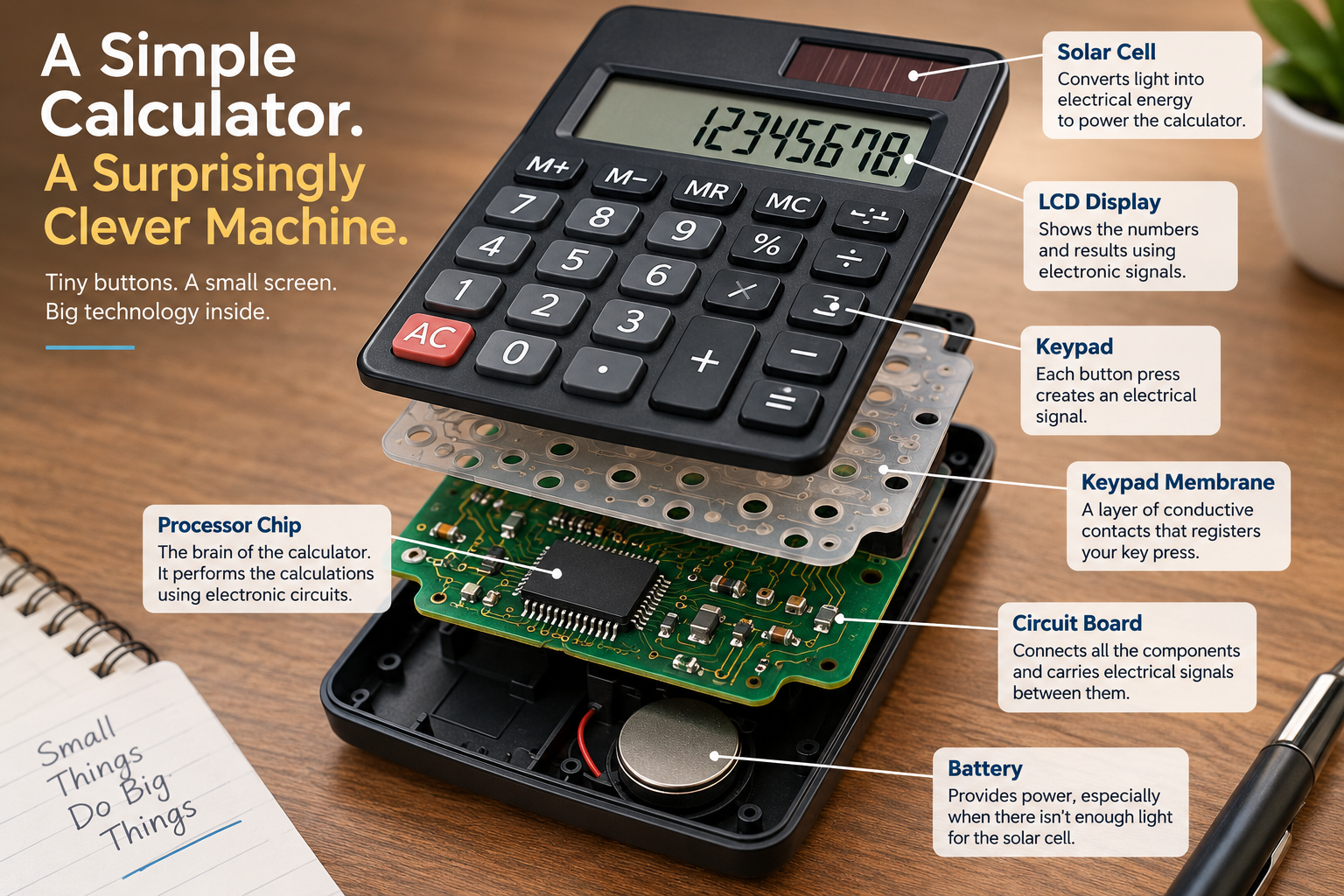
A basic electronic calculator typically contains four major systems:
- Keypad – receives your instructions
- Processor chip – performs the calculations
- Memory – temporarily stores numbers and operations
- Display – shows the result
It also needs a power source, usually a battery, solar cell, or both.
The remarkable thing is how small all of this can be.
A simple calculator doesn’t need a powerful computer processor like the one in your laptop. It has been designed to do a much narrower job—and that makes it extremely efficient.
What Happens When You Press a Calculator Button?
Let’s use a simple example:
25 + 17 =
You see the number 2 appear on the screen.
But the calculator doesn’t actually see the shape “2” the way you do.
Something much more interesting happens first.
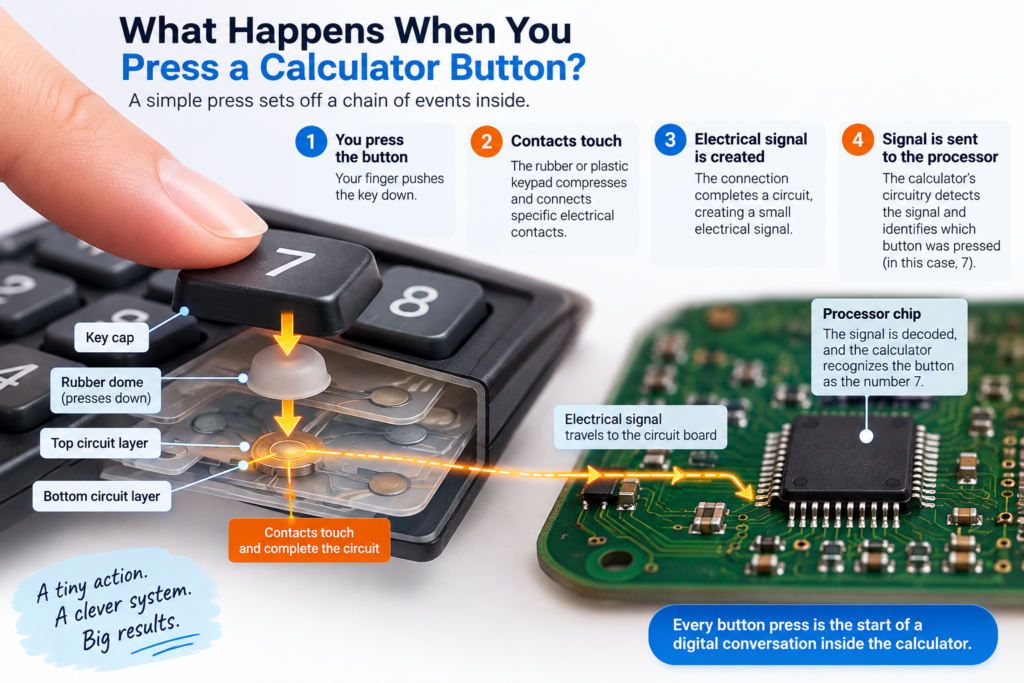
The button press creates an electrical signal
Underneath the calculator’s buttons is an electrical keypad.
When you press a button, a conductive material underneath it connects particular electrical contacts.
This changes the electrical state of the circuit.
The calculator’s electronics detect that change and determine which key was pressed.
So your finger doesn’t directly tell the calculator:
“I pressed the number 2.”
Instead, it creates a particular electrical pattern that the calculator recognizes as 2.
The same thing happens when you press 5, +, 1, 7, and finally =.
Just like a calculator detects a button press through changes in an electrical circuit, a smartphone uses electrical changes to detect where you touched the screen.
How Does a Calculator Understand Numbers?
This is where things get really interesting.
You see:
25
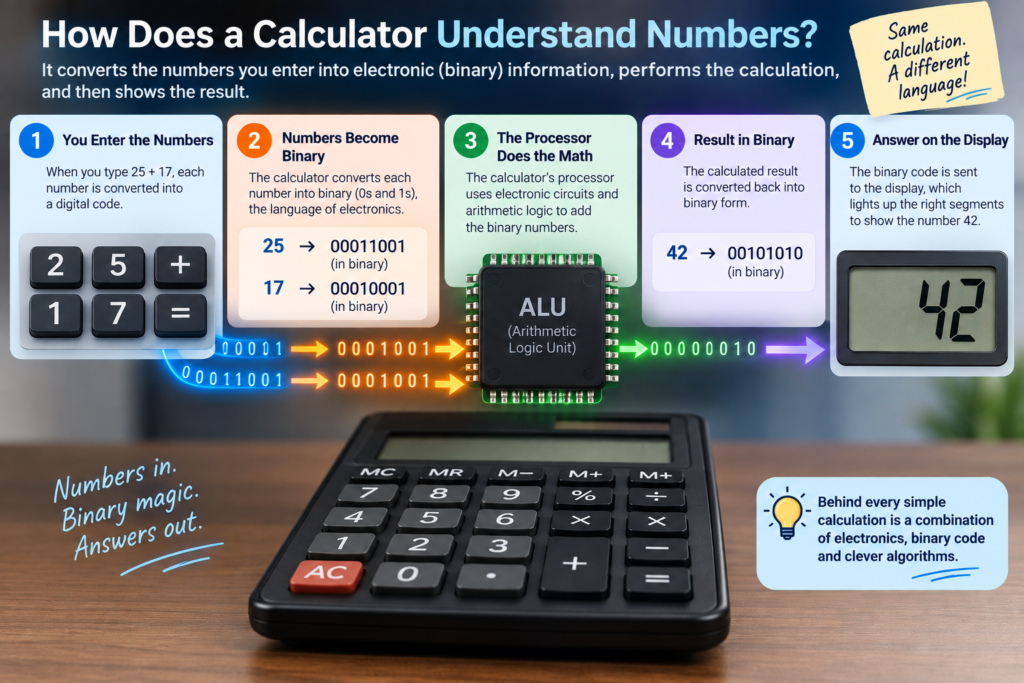
The calculator works with electronic representations of that information.
Digital electronics fundamentally use two states, commonly represented as:
0 and 1
These are called binary digits, or bits.
Inside the calculator’s processor, numbers and instructions are represented using electronic states corresponding to these binary values.
The processor can then manipulate those values using electronic circuits built from transistors and logic gates.
So, in a simplified way:
You see:25
Calculator’s electronics:01001...
Processor:
“Got it. This represents a number.”
The exact internal representation can vary depending on the calculator’s design, so it isn’t always useful to imagine every calculator simply converting every decimal digit into one straightforward binary number. But the important idea is that the processor works with electronic representations rather than the printed shapes you see on the buttons.
The Tiny Processor Inside a Calculator
The calculator’s processor is its brain.
It is an integrated circuit containing electronic circuits that carry out the instructions built into the calculator.
A simple calculator processor can:
- recognize key presses
- store numbers temporarily
- remember which mathematical operation was selected
- perform arithmetic
- handle functions such as percentages or square roots
- send information to the display
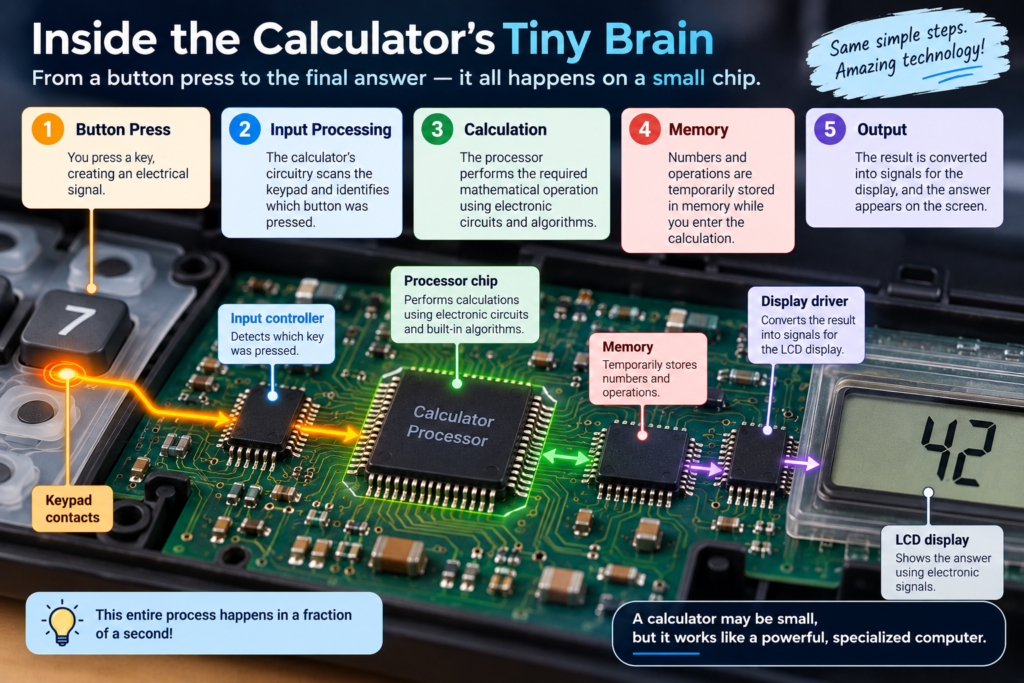
Some calculator chips contain dedicated sections for arithmetic and logic operations, along with circuits for scanning the keyboard and controlling the display.
And all of this happens incredibly quickly.
How Does the Calculator Actually Add 25 + 17?
Let’s simplify what happens.
You enter:
25 + 17
The calculator needs to remember several things:
First number: 25
Operation: +
Second number: 17
The processor temporarily stores this information.
Then it performs the requested operation.
At the electronic level, arithmetic is performed using combinations of logic circuits. These circuits are built from transistors, which behave somewhat like extremely tiny electronic switches.
Those switches can be combined to create logic gates and arithmetic circuits.
So something as ordinary as:
25 + 17 = 42
ultimately depends on an enormous number of incredibly small electronic decisions happening inside a silicon chip.
That’s quite a lot of technology hiding behind an innocent-looking + button.
But How Does It Multiply and Divide?
You might think:
Addition is easy—but multiplication and division must require something much more complicated.
They do require more processing.
But computers and calculators can build more complicated operations from simpler electronic operations and algorithms.
For example, multiplication can be implemented using combinations of addition, shifting and other operations.
Division can similarly be performed using algorithms based on repeated comparison, subtraction, shifting and related operations.
More advanced mathematical functions—such as logarithms, trigonometric functions and square roots—require additional algorithms and circuitry/software.
That’s why a scientific calculator contains considerably more functionality than a simple four-function calculator.
Where Does the Calculator Store the Numbers?
A calculator needs somewhere to temporarily keep information while you’re entering a calculation.
For example, when you type:
125 × 8
the calculator has to remember 125 while you enter 8.
It can use internal registers and memory areas for this purpose.
Basic calculators may have very limited memory, while more advanced calculators can store many values, variables, programs and other information.
That’s why some calculators have buttons such as:
M+
M−
MR
MC
These stand for memory functions.
They allow you to store a number and recall it later.
How Does the Calculator Show the Answer?
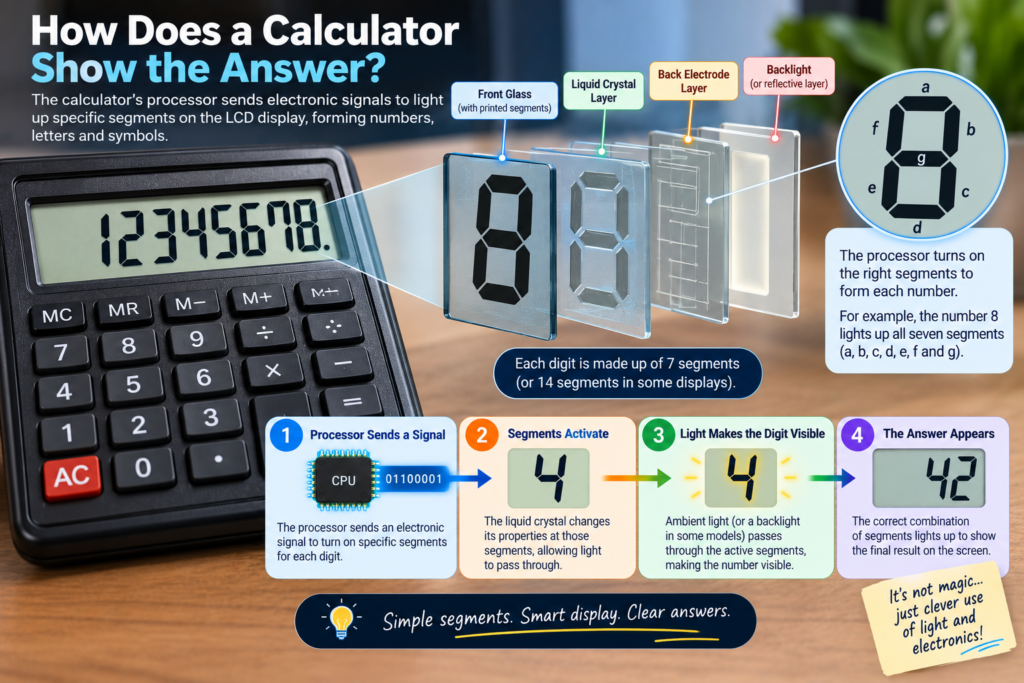
The processor has calculated the answer.
But now it has another job:
How do you turn electronic information into something humans can read?
That’s where the display comes in.
Most traditional calculators use an LCD—Liquid Crystal Display.
A basic calculator display often uses segments to create digits.
For example, a digit can be constructed from several segments:
 ───
│   │
 ───
│   │
 ───
By switching different segments on and off, the calculator can create different numbers.
An advanced calculator may use a more sophisticated dot-matrix or graphical display instead.
So when the calculator shows:
100
it isn’t drawing the number with a tiny electronic pen.
It is controlling microscopic electrical structures in the display so that the appropriate parts become visible.
Why Do Many Calculators Have Solar Panels?

It converts light into electrical energy.
Why can such a tiny solar panel power a calculator?
Because calculators are extremely energy efficient.
A simple calculator doesn’t need to run a powerful processor, bright screen, Wi-Fi connection or large operating system.
It performs a relatively small number of tasks and uses very little power.
Some calculators therefore use a solar cell as their primary power source, while others combine solar power with a small battery.
This is why a calculator can sometimes seem almost immortal.
You may have an old calculator sitting in a drawer for years, and it still works when you pull it out.
Why Is a Calculator So Fast?
Try calculating:
847 × 293
on paper.
It takes some time.
On a calculator, the answer appears almost instantly.
That’s because electronic circuits operate extraordinarily quickly compared with human actions.
Once you press the button, electrical signals travel through the calculator’s circuits, the processor executes its instructions, and the display is updated.
The calculator doesn’t need to “think” about the problem like a human mathematician.
It follows a predefined set of electronic instructions.
That’s one reason a calculator can perform a calculation in a tiny fraction of the time it takes you to reach for a pencil.
Are All Calculators the Same?
Definitely not.
A simple calculator and a graphing calculator may both give you an answer to a mathematical problem, but internally they can be dramatically different in capability.
Today, calculators range from simple four-function devices to scientific, financial, graphing, programmable and specialized calculators.
Let’s look at the major types.
1. Basic Calculator
This is the calculator most people recognize.
It normally handles:
- Addition
- Subtraction
- Multiplication
- Division
- Percentages
- Decimal calculations
- Basic memory functions
These calculators are designed for speed and simplicity.
They are commonly used for everyday arithmetic, shopping, business transactions and basic office calculations.
Their electronics are relatively simple because they don’t need to perform advanced mathematics.
Think of it as:
A calculator that does exactly what you need—and nothing more.
2. Scientific Calculator
Now add a lot more buttons and things get interesting.
A scientific calculator can handle functions such as:
- Square roots
- Powers
- Logarithms
- Trigonometric functions
- Fractions
- Scientific notation
- Statistics
- Mathematical constants
Scientific calculators are designed for mathematics, science and engineering applications.
The basic principle is still the same:
Key → electrical signal → processor → calculation → display
But the processor and software have to handle many more mathematical operations.
So when you press:
sin(30)
the calculator isn’t looking up the answer from a giant table of numbers.
It uses mathematical algorithms implemented in its electronics/software to calculate an approximation of the result.
3. Graphing Calculator
A graphing calculator takes things one step further.
Instead of simply giving you:
y = x²
it can actually draw the curve.
These calculators generally have larger and more capable displays and can plot mathematical functions, work with tables and perform advanced calculations. Many also support programming.
So a graphing calculator is much closer to a small specialized computer than a basic pocket calculator.
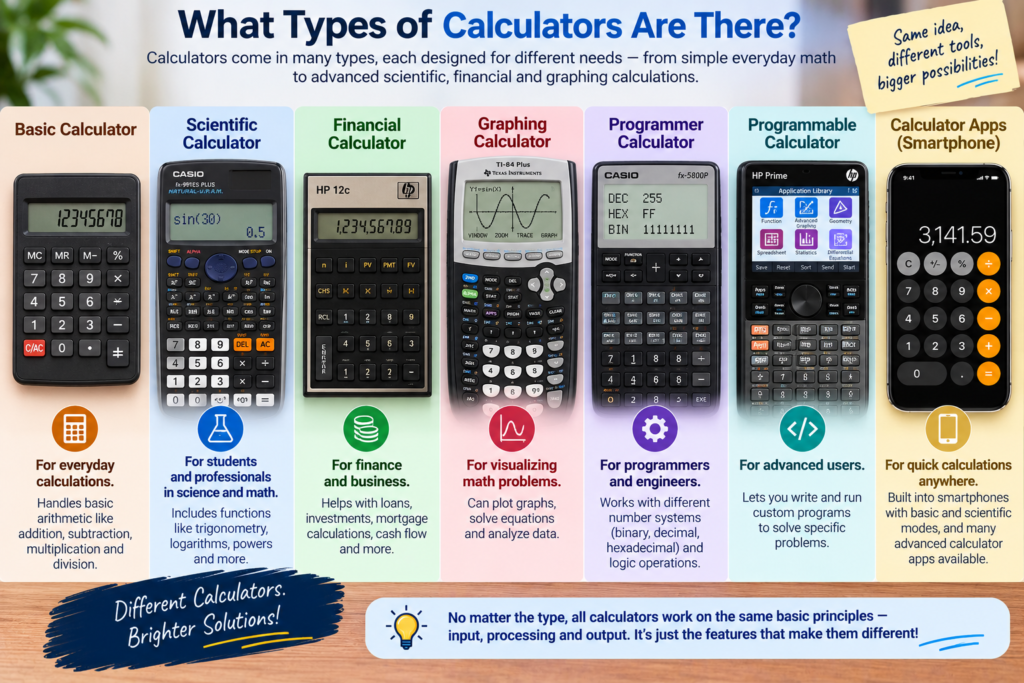
4. Financial Calculator
A financial calculator is designed around problems involving money and time.
It can include specialized functions for things such as:
- Interest rates
- Loans
- Mortgages
- Cash flows
- Investments
- Present value
- Future value
- Depreciation
Instead of forcing someone in finance to build every calculation manually, the calculator provides specialized mathematical functions for these tasks.
The underlying principle is still the same—but its software is designed around financial mathematics.
5. Programmer Calculator
This one is particularly interesting because it isn’t primarily designed for ordinary mathematics.
A programmer calculator can work with different number systems such as:
Binary
Decimal
Octal
Hexadecimal
It may also perform operations involving individual bits.
That makes it useful when working with computers, programming and digital electronics.
In other words, while a normal calculator asks:
“What is 25 × 4?”
a programmer calculator may be more interested in:
“What happens when I shift these bits?”
6. Programmable Calculator
Some advanced calculators can actually run programs.
Instead of simply pressing buttons to perform one calculation, you can give the calculator a sequence of instructions.
For example, you could create a program that repeatedly performs a particular mathematical calculation.
Some graphing calculators support programming languages or calculator-specific programming environments.
At this point, the calculator starts looking much more like a tiny computer.
7. Calculator Apps and Online Calculators
And then there is the calculator you probably use most often without even realizing it:
the one on your phone or computer.
The basic idea is still remarkably similar.
You tap a button.
The software interprets your input.
A processor performs the calculation.
The result appears on the screen.
The major difference is that your smartphone has vastly more computing power, memory and software than a simple pocket calculator.
Your phone’s calculator is therefore an application running on a general-purpose computer, rather than a tiny computer designed almost exclusively for calculations.
Calculator Types Compared
| Type | Best For | Typical Capabilities |
|---|---|---|
| Basic | Everyday arithmetic | +, −, ×, ÷, %, memory |
| Scientific | School, science & engineering | Trigonometry, logs, powers, fractions |
| Graphing | Advanced mathematics | Graphs, equations, tables, statistics |
| Financial | Finance & business | Interest, cash flow, loans, investments |
| Programmer | Computing & electronics | Binary, hexadecimal, bitwise operations |
| Programmable | Repeated/custom calculations | User-created programs |
| Phone/Online | General-purpose use | Basic to advanced calculations |
The important thing is that these aren’t fundamentally different inventions.
They are variations on the same basic idea:
Input → Processing → Output
The difference is how much processing they can perform and what instructions they have been designed to understand.
The Real Magic of a Calculator
A calculator doesn’t understand mathematics the way a human does.
It doesn’t look at 7 × 8 and think:
“Ah, seven groups of eight. That makes fifty-six.”
Instead, it follows an extraordinary chain of electronic instructions.
Tiny switches.
Electrical signals.
Binary representations.
Logic circuits.
Algorithms.
Memory.
A display.
Put all those simple pieces together, and you get a machine that can solve a mathematical problem almost instantly.
And perhaps that’s the most fascinating thing about a calculator:
Something that looks like a simple box of buttons is actually a tiny computer hiding in plain sight.