

Have you ever wondered how your phone knows that you are you just by looking at your face?
You look at your phone, and within a fraction of a second, it unlocks. You may be wearing glasses, have a new hairstyle, grow a beard, or even be standing in a dark room. Yet your phone can still recognize you.
So, how does Face ID recognize your face?
It doesn’t simply take a photograph of you and compare it with another photograph. Instead, it uses infrared light, thousands of invisible dots, a 3D map of your face, and powerful machine learning to recognize you.
Let’s see how it works.
How Does Face ID Recognize Your Face?
Face ID is a facial recognition system used by some smartphones and other devices to identify a person.
Instead of asking you to type a password or PIN, the device uses your face as a form of authentication.
But there is an important difference between looking at your face and understanding the shape of your face.
A normal camera captures a 2D photograph. Face ID uses special sensors to understand the three-dimensional shape of your face.
Think of it as your phone creating a tiny invisible 3D scanner.
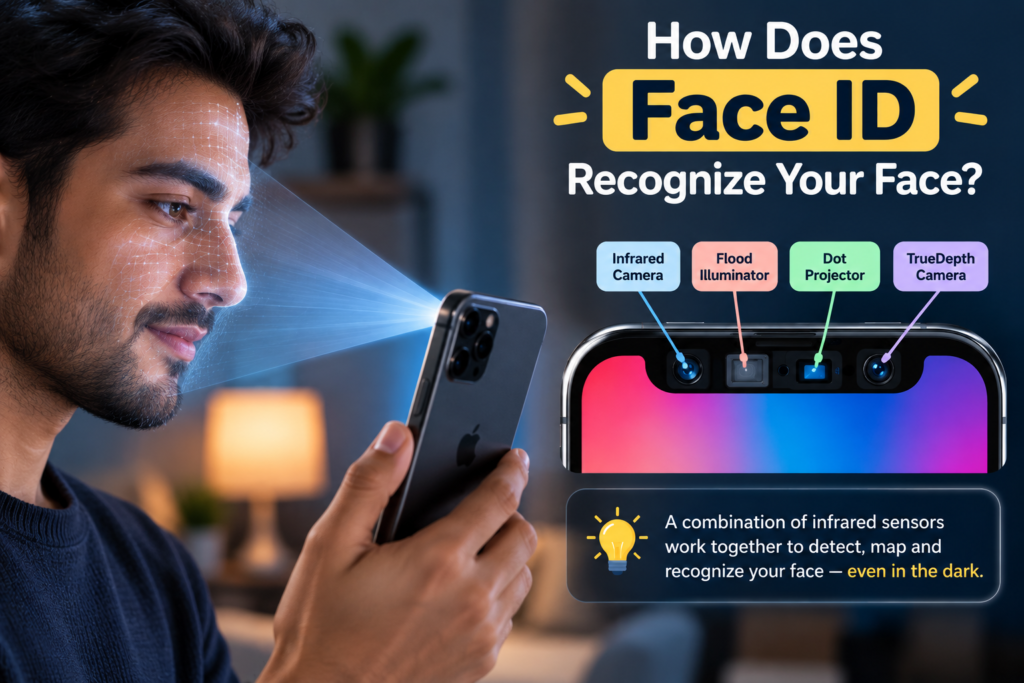
Step 1: Face ID Looks for Your Face
When you wake your phone and look at it, its front-facing sensors become active.
The system first needs to determine whether there is a face in front of it.
But it doesn’t rely only on visible light.
Face ID uses infrared (IR) light, which is invisible to our eyes.
This is especially useful because infrared sensing can work even when the room isn’t brightly lit.
That’s why your phone can recognize you even when you’re sitting in a dark room.
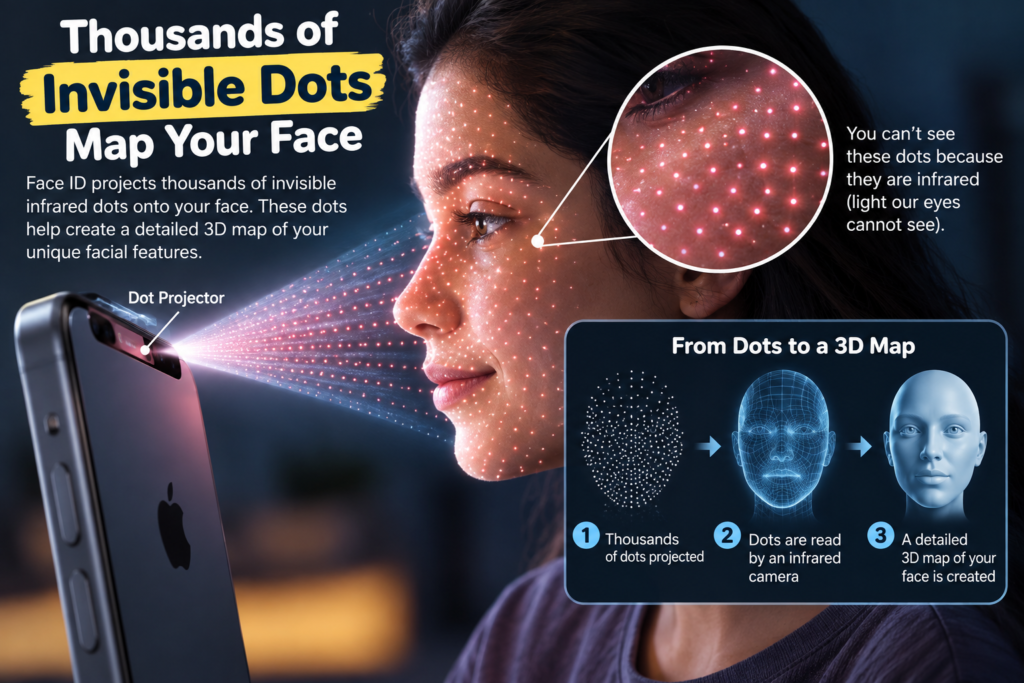
Step 2: Thousands of Invisible Dots Are Projected Onto Your Face
This is where things get really interesting.
A component called a dot projector shines thousands of tiny infrared dots onto your face.
You can’t see these dots because they are made using infrared light.
Imagine shining a grid of tiny spots onto a 3D object.
If you shine the dots onto a flat wall, they form one pattern.
But if you shine them onto your face, the pattern changes because your face isn’t flat.
Your nose sticks out.
Your eyes are slightly recessed.
Your cheeks and forehead have different shapes.
So the dots become a kind of invisible fingerprint of the shape of your face.
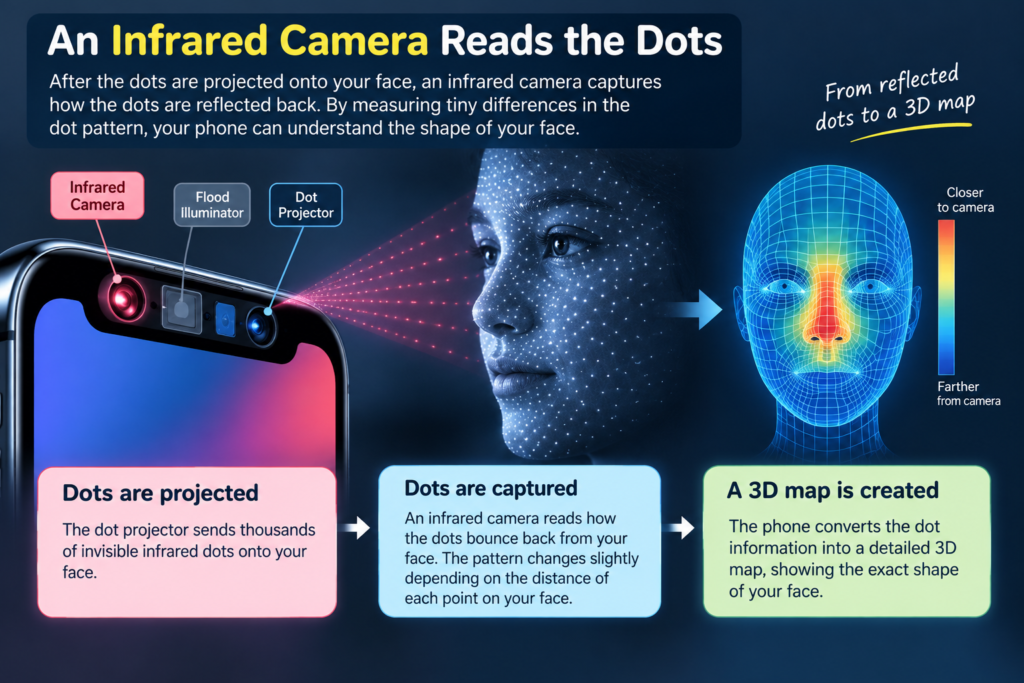
Step 3: An Infrared Camera Reads the Dots
Another sensor, an infrared camera, looks at the pattern created by those dots.
It can determine how the dots are positioned on your face.
Because different parts of your face are at different distances from the phone, the system can work out the depth and shape of your facial features.
For example:
- Your nose is closer to the phone.
- Your cheeks are farther away.
- Your eye sockets have different depths.
- Your forehead has another shape.
Together, all this information helps the phone build a 3D representation of your face.
Step 4: Your Face Becomes a Mathematical Pattern
The phone doesn’t need to remember your face as an ordinary photograph.
Instead, the information about your face is converted into mathematical data.
You can think of it like creating a secret numerical description of your face.
For example, the system can represent things such as:
distance between the eyes + shape of the nose + contours of the face + depth information + other facial features
Of course, the real system is far more complicated than this simple example.
The result is a mathematical face template that can be used for comparison.
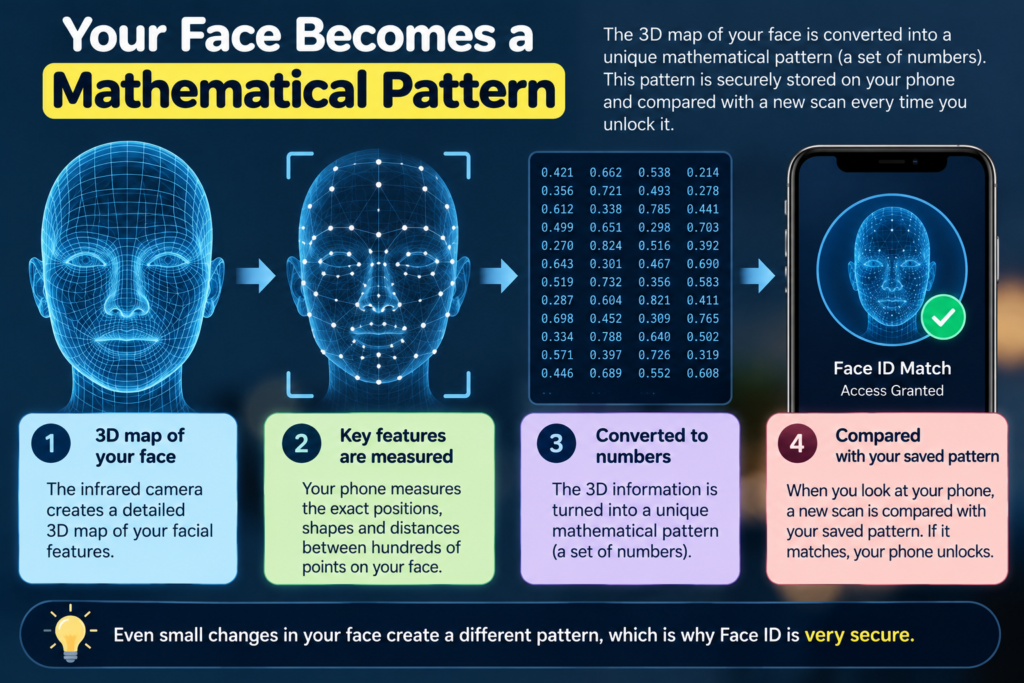
Step 5: Your Phone Compares the New Scan With Your Stored Face
When you first set up Face ID, the phone learns what your face looks like.
Later, whenever you try to unlock it, the system performs another scan.
It creates a new mathematical representation of the face in front of it.
Then it asks:
Does this new face match the face that was registered earlier?
If the system determines that the match is strong enough, your phone unlocks.
If it doesn’t match closely enough, the phone stays locked.
So Face ID isn’t really asking:
“Does this photograph look exactly like the old photograph?”
It is asking something closer to:
“Does the 3D facial information in front of me match the person I know?”
How Can Face ID Recognize You in the Dark?
This seems almost like magic.
You might think:
“If the room is dark, how can the phone see my face?”
The answer is infrared light.
Unlike visible light, infrared light cannot be seen by your eyes.
The Face ID system can illuminate your face using infrared light and then use its infrared sensors to detect the reflected light.
So even though you can’t see the light, the phone’s sensors can.
This is one reason facial recognition systems can work in conditions where an ordinary camera might struggle.
Is Face ID's Infrared Light Safe?
When you hear that Face ID shines thousands of invisible infrared dots onto your face, you might wonder:
“Isn’t radiation dangerous?”
The good news is that infrared radiation is generally not harmful at the low levels used by facial-recognition systems such as Face ID.
Infrared is a form of non-ionizing radiation. It has less energy than visible light and doesn’t have enough energy to directly damage DNA in the way high-energy radiation such as X-rays and gamma rays can.
But infrared isn’t automatically harmless in every situation. Very intense infrared radiation can produce heat and damage skin or eyes. For example, powerful infrared heaters and industrial equipment can generate enough infrared energy to cause burns.
The infrared used for facial recognition is very different. Face ID is designed to use a low level of infrared illumination for a very short period while scanning your face.
So, when your phone uses Face ID, you don’t need to worry about it exposing your face to dangerous radiation.
🔬 Did You Know?
Infrared isn’t something invented for smartphones. Your own body constantly gives off infrared radiation!
Anything that has a temperature above absolute zero emits infrared radiation. That’s why thermal cameras can detect people even in darkness—they detect the infrared radiation associated with the heat coming from our bodies.
So infrared isn’t simply “dangerous radiation.” It is a natural part of the world around us, and its effects depend largely on how much energy is involved and how long you’re exposed to it.
How Does Face ID Know You're a Real Person?
There’s another important problem that facial recognition systems need to solve.
What if someone simply holds a photograph of you in front of the phone?
A photograph shows what your face looks like, but it doesn’t contain the same 3D shape and depth information as a real face.
Because Face ID uses depth information, it can distinguish a real three-dimensional face from a flat image much more effectively than ordinary 2D facial recognition.
This is known as liveness detection or spoof detection.
The system uses information from the sensors to help determine whether it is looking at a real person rather than simply an image.
What If You Grow a Beard or Change Your Hairstyle?
Our faces don’t remain exactly the same forever.
You might:
- grow a beard
- shave your beard
- wear glasses
- change your hairstyle
- get older
- change your appearance in other ways
So how can Face ID still recognize you?
This is where machine learning becomes important.
The system isn’t looking for one perfectly identical image every time.
Instead, it learns the important characteristics of your face and is designed to handle reasonable changes in your appearance.
That’s why changing your hairstyle doesn’t necessarily mean you have to register your face again.
Does Face ID Take a Picture Every Time?
It uses cameras and sensors to scan your face, but the important part is what the system does with that information.
The purpose of Face ID is to compare the facial information from the current scan with the stored mathematical representation used for authentication.
In Apple’s implementation, the Face ID facial data is processed on the device and the mathematical representation is protected in the device’s secure hardware rather than being uploaded as an ordinary photograph to Apple’s servers.
This is an important part of the security design.
Why Is a 3D Face Map Better Than a Photograph?
Imagine that you have two photographs of a person.
One is taken from the front.
The other is taken from a slightly different angle.
They won’t look exactly the same.
Now imagine trying to recognize someone from a photograph while they are wearing glasses or have changed their hairstyle.
It becomes more difficult.
A 3D representation provides much more information.
Instead of simply knowing what the face looks like, the system can also understand the shape and depth of the face.
That’s what makes 3D facial recognition so powerful.
Face ID in One Simple Diagram
The whole process can be simplified like this:
Your face
⬇️
Infrared light + thousands of invisible dots
⬇️
Infrared camera detects the pattern
⬇️
3D shape of your face is calculated
⬇️
Mathematical face representation is created
⬇️
Compared with your stored face template
⬇️
Match? → Phone unlocks 🔓
Is Face ID the Same as a Normal Camera?
No.
A normal smartphone camera mainly captures visible light and produces a 2D image.
A Face ID system uses additional technologies to gather information about depth and facial structure.
That’s why it can do more than simply recognize a photograph.
You can think of the difference this way:
Normal camera:
“What does this face look like?”
3D facial recognition:
“What does this face look like, and what is its 3D shape?”
Your phone already uses clever technology to figure out where you touched the screen. Face ID takes that idea much further—it uses specialized sensors to understand the shape and features of your face.
The Amazing Science Behind Something You Use Every Day
The next time your phone unlocks just because you looked at it, remember that several technologies are working together in a tiny space.
Your phone is using:
– Infrared light to illuminate your face
– A dot projector to create an invisible pattern
– An infrared camera to detect that pattern
– 3D sensing to understand the shape of your face
– Machine learning to recognize your facial characteristics
– Secure hardware to protect the information used for authentication
All of this happens incredibly quickly.
What feels like “my phone looked at me and recognized me” is actually a fascinating combination of optics, infrared technology, mathematics, 3D sensing, artificial intelligence and computer security.
And that is the real magic behind Face ID.
Your smartphone is packed with technology that seems almost magical—from recognizing your face to charging without a cable.