
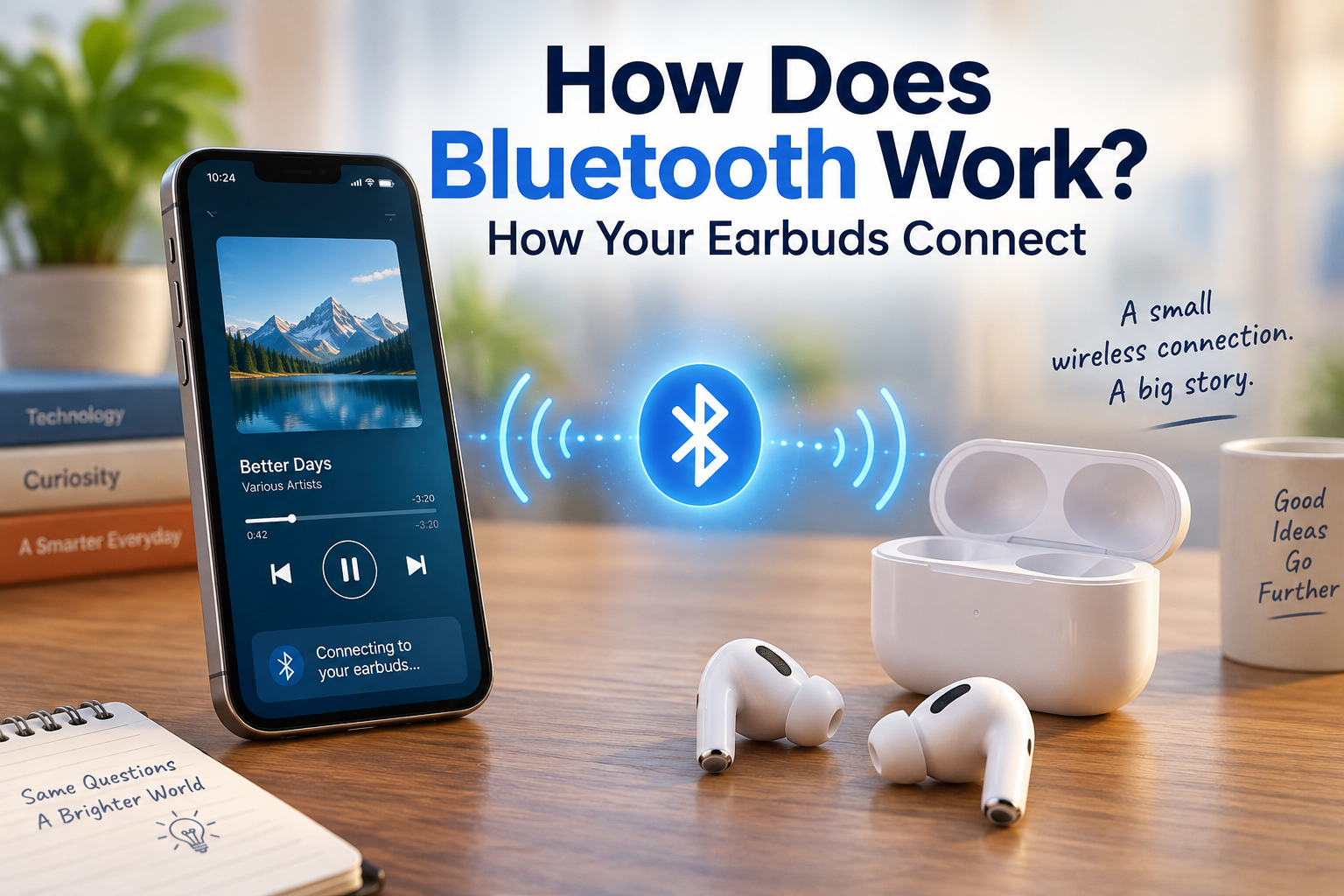
How does Bluetooth work? You take your earbuds out of their case, put them in your ears, and a moment later your phone says:
“Connected.”
No cable. No plugging in. No Wi-Fi password.
But what actually happened?
How did your phone find those tiny earbuds? How did the two devices know they could trust each other? And how does music travel from your phone to your ears without a wire?
It may look like magic, but there is a fascinating process happening behind the scenes.
Bluetooth allows nearby devices to discover each other, establish a connection, exchange information and communicate wirelessly.
Let’s see how it works — using your earbuds as our example.
Did You Know - Bluetooth Isn't Actually an Acronym?
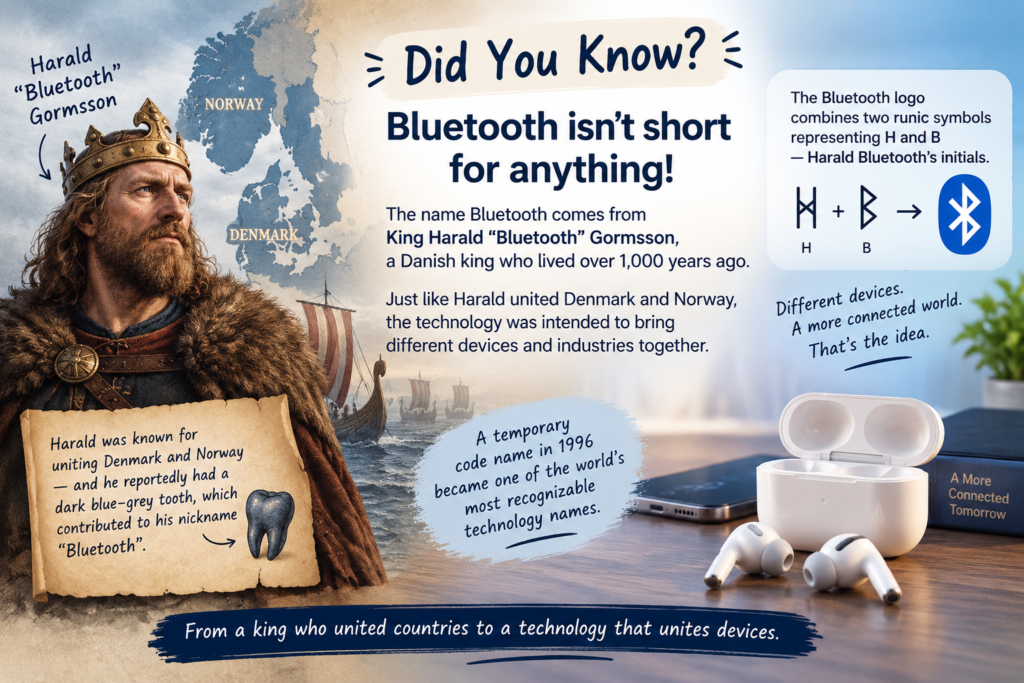
Before we get into the technology, here’s a surprising fact:
Bluetooth isn’t short for anything.
The name comes from King Harald “Bluetooth” Gormsson, a Danish king who lived more than 1,000 years ago.
According to the Bluetooth SIG, Harald was associated with uniting Denmark and Norway. When engineers from Intel, Ericsson and Nokia were working on a new short-range wireless technology in the 1990s, Intel’s Jim Kardach suggested “Bluetooth” as a temporary code name because the technology was also intended to bring different devices and industries together.
The temporary name stuck.
And there’s another fun detail: Harald reportedly had a dark blue-grey tooth, which contributed to his nickname Bluetooth.
Even the familiar Bluetooth logo has a historical connection. It combines two runic symbols representing H and B, Harald Bluetooth’s initials.
So the next time you see that little Bluetooth symbol, you’re actually looking at a logo with more than a thousand years of history behind it.
So, How Does Bluetooth Work?
Bluetooth is a short-range wireless communication technology that allows electronic devices to exchange information without physical cables.
For a deeper look at how Bluetooth works—including Bluetooth Classic, Bluetooth LE, radio channels, and frequency hopping—see the official Bluetooth Technology Overview from the Bluetooth SIG.
It can connect things such as:
- Wireless earbuds
- Smartphones
- Smartwatches
- Wireless keyboards
- Computer mice
- Game controllers
- Speakers
- Cars
- Fitness trackers
Bluetooth isn’t just for sending music.
It can also carry commands, sensor information and other types of data.
The technology has evolved considerably since its early days and is now used in everything from headphones and phones to medical devices, industrial equipment and smart lighting.
But let’s keep things simple and see what happens when you connect your earbuds.
Step 1: Your Earbuds Wake Up
You open the charging case.
The earbuds wake up and prepare to communicate.
Depending on the design, the earbuds may advertise their availability or otherwise become ready for reconnection.
Your phone, meanwhile, has Bluetooth hardware capable of communicating with nearby Bluetooth devices.
The two devices haven’t started exchanging music yet.
First, they need to find each other.
Step 2: Your Phone Finds Your Earbuds
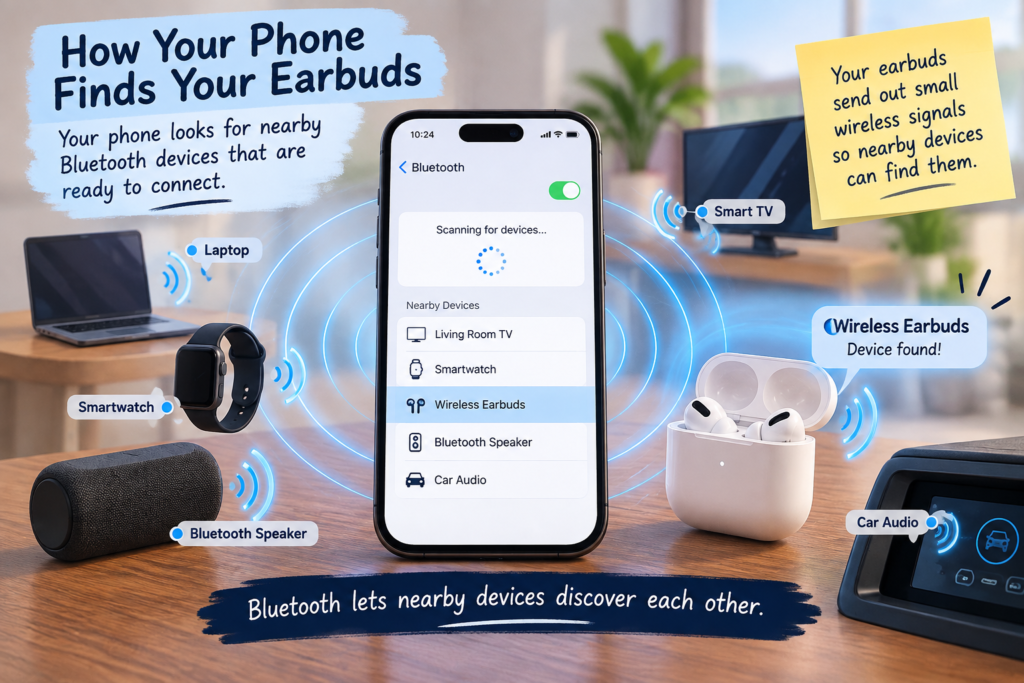
When you search for Bluetooth devices on your phone, it looks for nearby devices that are available to communicate.
Your earbuds send out small wireless signals containing information that allows compatible devices to discover them.
Your phone detects those signals and may display something like:
“Wireless Earbuds”
Your phone has essentially discovered a tiny computer with a radio inside it.
But finding the earbuds isn’t the same as connecting to them.
That’s the next step.
Step 3: You Tap “Pair”
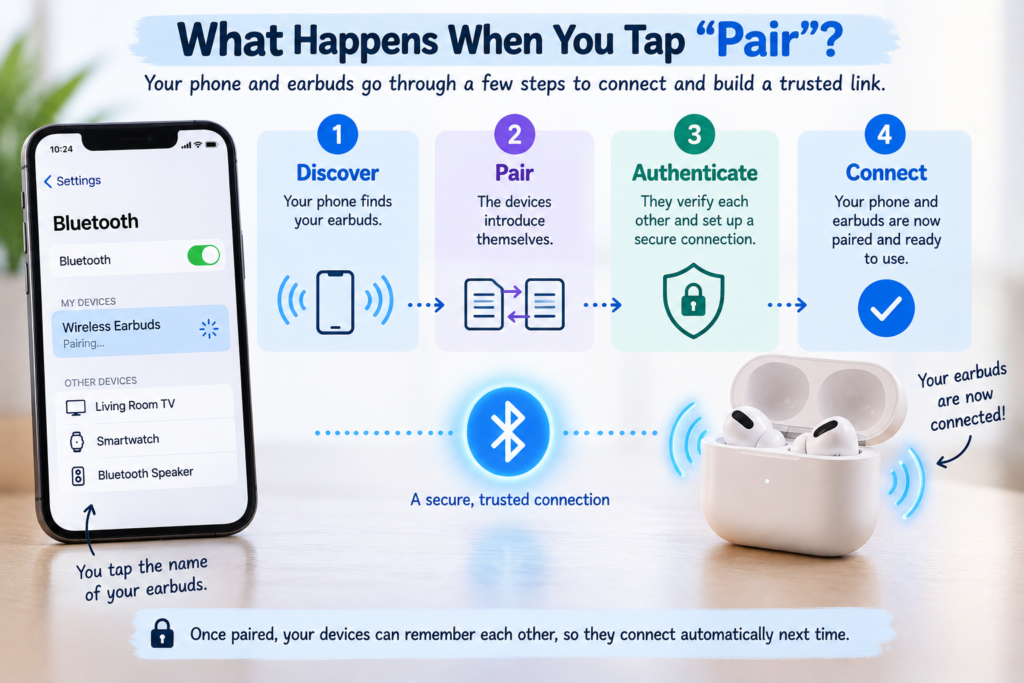
You tap the name of your earbuds.
This begins the pairing process.
Pairing is essentially the process of establishing a relationship between two Bluetooth devices so they can communicate securely.
The devices exchange information and perform security procedures appropriate to the type of Bluetooth connection being established.
Think of it as two strangers introducing themselves:
Phone: “Who are you?”
Earbuds: “I’m your earbuds.”
Phone: “How do I know you’re really you?”
The Bluetooth security system helps the devices establish the necessary trust for the connection. Bluetooth specifications include security features designed to protect communication between Bluetooth devices.
Once the devices have successfully paired, they can remember information that makes future connections much easier.
Step 4: Your Phone and Earbuds Agree on What They Can Do
Bluetooth devices can have different capabilities.
Your earbuds might support:
- Music playback
- Phone calls
- Microphone input
- Play/pause controls
- Volume controls
- Battery information
- Other device-specific features
Your phone and earbuds therefore need to establish how they will communicate and which functions are available.
Bluetooth uses defined profiles and protocols for different types of communication.
For example, audio streaming and hands-free calling involve different Bluetooth functionality.
In other words, Bluetooth isn’t just saying:
“We’re connected.”
The devices also need to understand:
“Here’s what we can do together, and here’s how we’re going to do it.”
Step 5: Your Music Is Turned Into Digital Data
Now press Play.
Your phone doesn’t send sound through the air.
Instead, the music exists inside your phone as digital information.
Before it can be transmitted to the earbuds, the audio is processed and encoded using an appropriate Bluetooth audio codec.
A codec essentially provides a way of representing audio so it can be transmitted efficiently.
Different phones and earbuds may support different codecs, so the exact technology used can vary between devices.
But the basic idea is simple:
Music → Digital audio data → Bluetooth transmission
Step 6: Bluetooth Sends the Data Through Radio Waves
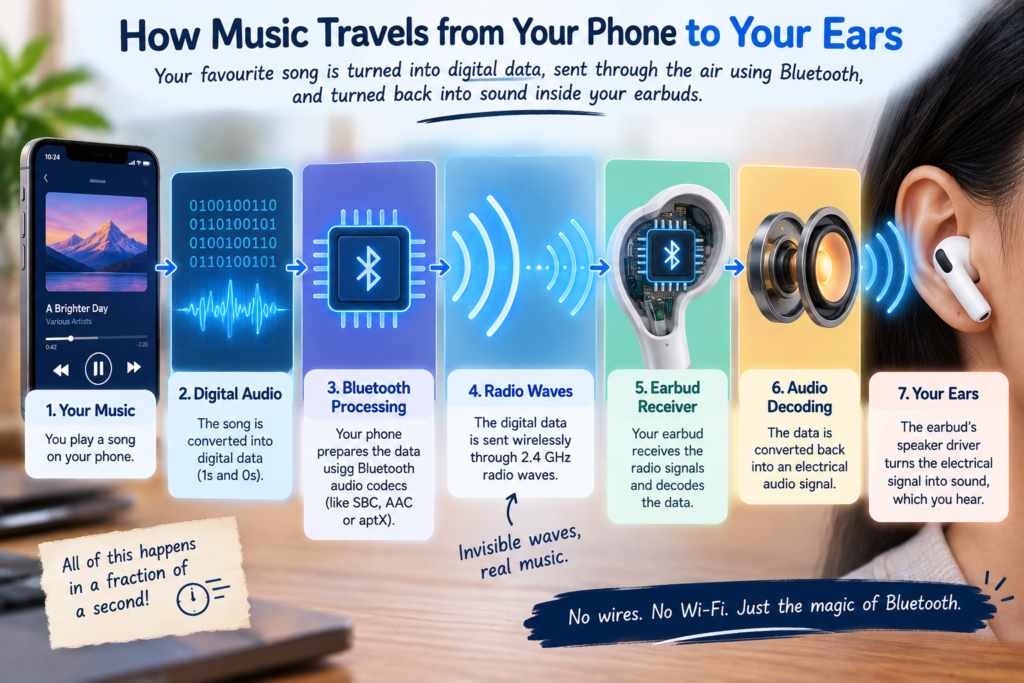
Now comes the part that seems like magic.
Your phone’s Bluetooth radio transmits the digital information using radio waves.
Bluetooth operates in the 2.4 GHz radio band.
Your phone isn’t sending an invisible version of the actual sound toward your earbuds.
It’s sending encoded digital information through a wireless radio link.
The earbuds receive that radio transmission.
So we now have:
Phone
↓
Digital audio data
↓
Bluetooth radio transmission
↓
Wireless signal
↓
Earbuds
Step 7: Your Earbuds Turn the Data Back Into Sound
Your earbuds receive the wireless signal.
Inside each earbud are tiny electronic components that process the incoming information.
The audio data is decoded and converted into an electrical signal.
That signal drives a tiny speaker driver inside the earbud.
The driver vibrates.
Those vibrations move the air.
Your ears detect those changes in air pressure.
And your brain interprets them as music.
So the complete journey looks something like this:
Music on your phone
↓
Digital audio
↓
Bluetooth processing
↓
Radio waves
↓
Earbud receiver
↓
Audio decoding
↓
Speaker driver
↓
Your ears
All of that happens while you simply sit back and listen.
Bluetooth is just one example of technology working behind the scenes. Your smartphone uses many other clever systems that we rarely think about. For example, have you ever wondered how your touchscreen knows exactly where your finger touched? Find out in [How Does a Touchscreen Know Where You Touched?].
But How Do Two Wireless Earbuds Work Together?
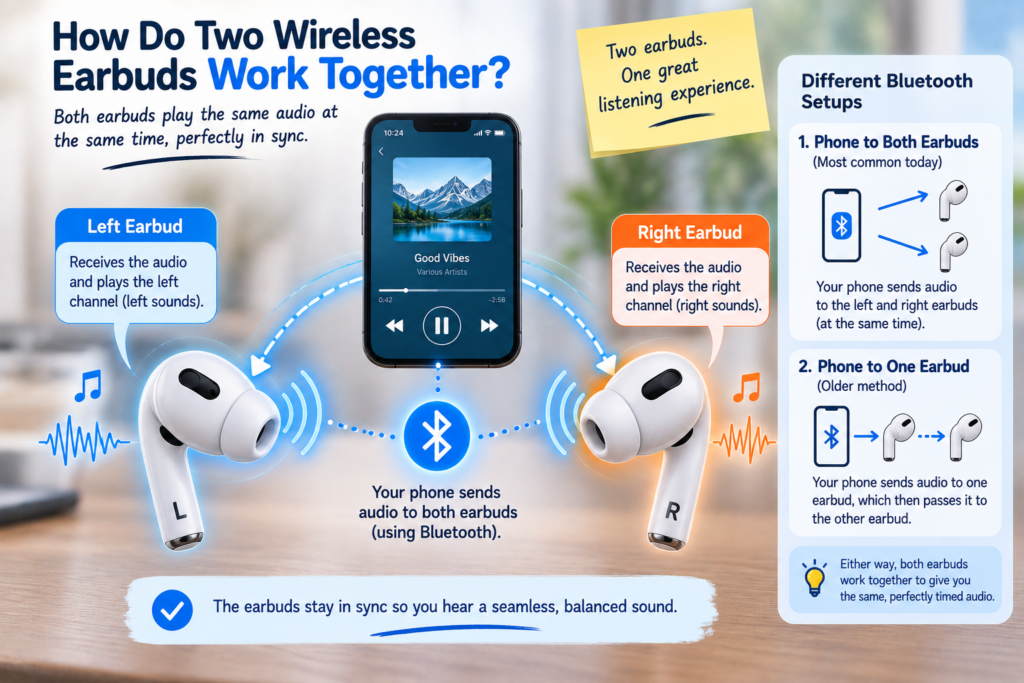
This is one of the clever parts.
You have two separate pieces of hardware sitting in your ears, but your brain experiences them as one pair.
The Bluetooth system needs to coordinate audio playback so the left and right channels stay properly synchronized.
Exactly how this happens depends on the Bluetooth technology and earbud design.
Newer Bluetooth LE Audio systems can use architectures in which the phone establishes Bluetooth connections with the individual earbuds, while other designs use different arrangements to coordinate the pair.
The important thing is that the system keeps the audio synchronized closely enough that your brain perceives it as one seamless stereo experience.
How Does Bluetooth Send Music Without Wi-Fi?
This is a common point of confusion.
Bluetooth does not need the internet.
Your phone can play a downloaded song through Bluetooth even if there is no Wi-Fi connection.
Think of it this way:
Internet
↓
Your phone
↓
Bluetooth
↓
Your earbuds
Wi-Fi and Bluetooth are both wireless technologies, but they serve different purposes.
Wi-Fi is primarily designed to connect devices to networks.
Bluetooth is designed for short-range communication between nearby devices.
That’s why your earbuds don’t need their own internet connection just to play music from your phone.
Bluetooth vs Wi-Fi: What's the Difference?
| Bluetooth | Wi-Fi |
|---|---|
| Designed for short-range device connections | Designed primarily for network connections |
| Generally optimized for low-power communication | Designed for higher-throughput networking |
| Commonly connects peripherals | Commonly connects devices to networks |
| Great for earbuds, keyboards and controllers | Great for internet access and local networks |
| Usually involves nearby devices | Can cover much larger areas |
They’re not competing versions of the same technology.
They’re designed for different jobs.
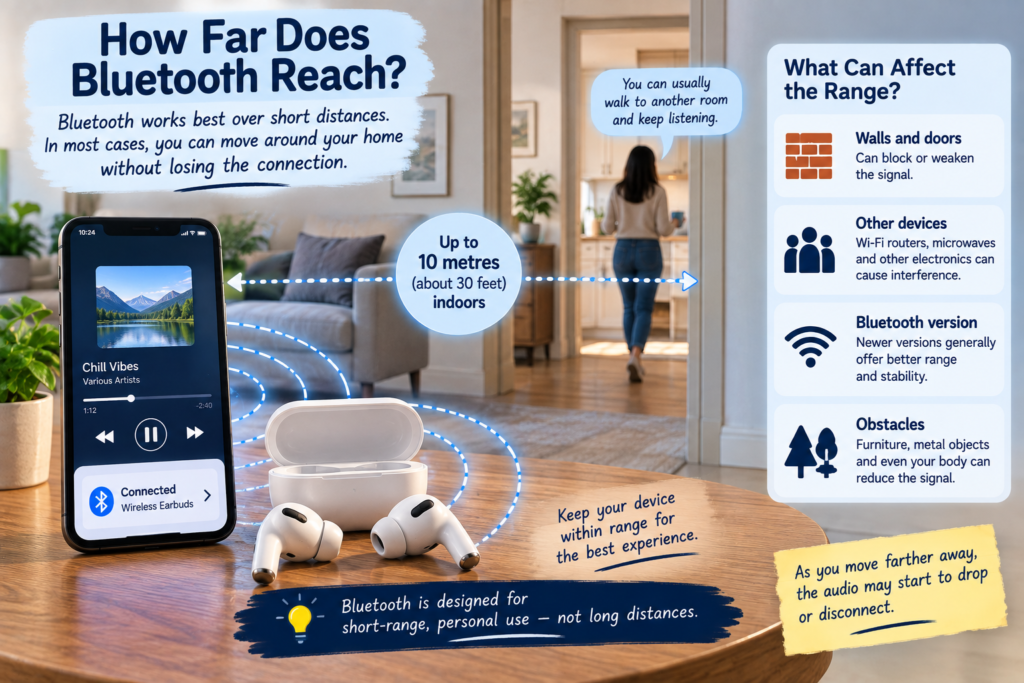
Why Does Bluetooth Sometimes Disconnect?
Bluetooth connections aren’t magical or unlimited.
Several things can affect them.
Distance
Move far enough away from your phone and the wireless signal can become too weak for a reliable connection.
Obstacles
Walls, furniture and even your body can affect radio signals.
Radio interference
Bluetooth operates in the 2.4 GHz band, which is also used by other wireless technologies.
Bluetooth is designed to operate in this busy environment and uses techniques such as frequency hopping to help maintain communication.
Low battery
Your earbuds contain very small batteries.
When their power gets critically low, they may disconnect or shut down.
Software problems
Sometimes the radio connection itself isn’t the problem.
A temporary issue with your phone, earbuds or their software can also cause a connection to fail.
That’s why the classic:
“Turn Bluetooth off and on again.”
can sometimes work surprisingly well.
Why Do Bluetooth Earbuds Connect Automatically?
You probably don’t manually pair your earbuds every morning.
Once your phone and earbuds have been paired, they can retain information that helps them recognize each other later.
So when you open your case:
Earbuds wake up
↓
Phone recognizes them
↓
Connection is established
↓
Music starts
That’s why the process feels almost instantaneous.
The devices have already introduced themselves.
They’re simply meeting again.
How Does the Earbud Case Know What to Do?
The charging case does more than store your earbuds.
It also helps manage their power and charging state.
When you place the earbuds inside, they can stop their active wireless operation and enter a lower-power state, depending on the design.
Take them out again and they can wake up and become ready for use.
That’s how something as simple as:
Open case → put earbuds in ears → start listening
can hide a surprisingly sophisticated sequence of electronic events.
How Do Earbuds Know When You Remove Them?
Many modern earbuds contain sensors that can detect whether they are being worn.
Depending on the design, these may include optical, infrared, capacitive or other types of sensors.
That’s how an earbud can know:
“I’ve been removed from the ear.”
It can then trigger an action such as pausing your music.
Put it back in, and playback may resume.
So Bluetooth isn’t actually detecting that you removed the earbud.
A sensor inside the earbud detects it.
Bluetooth simply provides a way for devices to communicate information and commands.
Why Is There Sometimes a Delay?
Have you ever watched a video and noticed that the person’s lips move slightly before you hear the words?
That’s audio latency.
Your audio has to go through several stages:
Audio processing
↓
Encoding
↓
Bluetooth transmission
↓
Decoding
↓
Audio playback
Each stage takes some time.
For ordinary music listening, a small delay usually isn’t noticeable.
But gaming, video calls and other applications can make even a small delay obvious.
That’s why some Bluetooth systems are designed to reduce audio latency.
Is Bluetooth Sending the Whole Song at Once?
No.
Your phone continuously sends a stream of audio data while the song is playing.
It’s more like sending a continuous flow of small pieces of information than sending the entire song in one giant wireless package.
The earbuds receive and process that stream continuously.
That’s also why your phone can send commands such as:
Play
Pause
Skip
Previous track
while the music is playing.
Bluetooth isn’t just carrying audio.
It can also carry control information.
What Happens When You Press Pause?
When you tap your phone’s pause button, the phone sends the appropriate control instruction to the audio system.
When you press a button or touch control on the earbuds, the earbuds can send information back toward the phone.
So your earbuds aren’t simply receivers.
They’re two-way communication devices.
They can receive information from your phone and send information back.
That’s how features such as play/pause, track skipping, call controls and other functions can work.
Why Can You Put Your Phone in Your Pocket?
Because Bluetooth uses radio waves rather than a physical cable.
The phone doesn’t need to be directly visible to your earbuds.
The radio signal can travel through the surrounding environment, although objects and your body can affect its strength.
That’s why you can put your phone in your pocket and continue listening.
The cable has effectively been replaced by a tiny wireless communication link.
So What Really Happens When You Tap “Connect”?
It feels like one simple action.
But behind that button is a sequence something like this:
1. Discover
Your phone finds the earbuds.
↓
2. Pair
The devices establish their relationship.
↓
3. Authenticate and secure
They establish the information needed for secure communication.
↓
4. Connect
The devices establish the appropriate communication links.
↓
5. Configure
They determine how supported functions such as audio will be handled.
↓
6. Transmit
Your phone sends digital information using Bluetooth radio.
↓
7. Receive
The earbuds receive the wireless data.
↓
8. Decode
The earbuds turn the incoming information back into audio.
↓
9. Play
Tiny speaker drivers create the sound you hear.
And all of this can happen in just a few moments.
The Simple Answer
So, how does Bluetooth work?
Bluetooth allows nearby electronic devices to communicate wirelessly using radio signals.
When you connect your earbuds, your phone first discovers them. The devices then pair and establish the necessary security and communication settings. Once connected, your phone sends digital audio data wirelessly, and the earbuds receive, decode and convert that information into sound.
What looks like a simple “Connected” notification is actually a conversation between tiny computers.
And perhaps the most surprising part?
Bluetooth itself was named after a king who lived more than a thousand years ago.
A temporary code name became one of the world’s most recognizable technology names.
Not bad for a name that was never supposed to be permanent.